It’s Good to be SEEN

Saturday, 09 March 25, I made the two-hour trip over to Bessemer, AL to attend a SouthEast Emergency Network (SEEN) meeting. The meeting was to start preparation for an upcoming Field Training Exercise (FTX) in April. I was here to support my friend and SEEN founder Billy N4WXI.

Billy started SEEN a couple of years ago to serve his local area in case of a communications emergency using GMRS. It has since grown into a service covering the Gulf Coast States including Georgia. These are the States most affected by hurricanes. Hurricanes when they make landfall can cause extensive damage over wide areas. The focus of SEEN is to provide communications during the first few days of a disaster or until government agencies can recover their communications. SEEN is also affiliated with the American Radio Redoubt Operators Network (AmRRon). This affiliation will allow SEEN to pass messages from the southeast to AmRRon to anywhere in the USA.

SEEN primarily uses digital modes to pass traffic because it is quicker, more resilient to interference, and more accurate. Billy feels the main role of SEEN is to pass health and welfare traffic to connect families and friends inside and out of the disaster area. SEEN uses 3 apps/modes: FLdigi, JS8CALL, and VARAC. Right now, FLdigi is the heavy lifter, it has multiple modes and is used by many organizations. This allows cross group communications. The second is JS8CALL. JS8CALL is a slower but more robust and because of its excellent weak signal characteristics, it is used when nothing else will work. VARAC is the new kid on the block and has a lot of promise. This app uses VARA which is also used by Winlink. It has pretty good weak signal characteristics, but speed and automatic error correction are its strong points. A message sent through FLdigi using a mode like MFSK32 can take 5 minutes. Using JS8CALL can take 10 minutes or more. VARAC using VARA can send the same message in about 30 seconds. A good part of this meeting was spent getting folks up to speed on these modes. These are the ones that will be used during the upcoming FTX.

One of the topics talked about me sending Billy an intelligence brief from my mobile using VARAC on 40 meters. That story can be found here: KK4Z SEEN FTX 2024. The radio install can be found here: KK4Z mobile install.

As with any ham radio related meeting, the topic turned to equipment and gear. Some folks were thinking about using a QRP radio for the FTX. Both Billy and I recommended against it. There are good reasons not to and I will name a few: 1) digital modes have a high duty cycle when compared to SSB and CW. This causes the radio to heat up quicker and because QRP radios are small, there is not enough heatsink to mitigate the excess heat. The radios overheat and then automatically reduce power or shutdown. I have done this twice with two different QRP radios. They have their place, but not with EmComm. 2) Power. The primary purpose of EmComm is to get the message through, this is not a contest of how low you can go. You can always turn a QRO radio down but you can’t turn a QRP radio up. With a big radio like an IC-7300, I can run digital modes at 40 watts all day long and the radio will not even get warm.

Antennas. Again, the purpose is to get the message through. Put up the best antenna you can. Bigger is better. Your antenna in the field will not perform the same as your antenna at the home QTH. The only way you will know how your field system works is to take it out to the filed and use it. When I go on my trips, I use the same gear as I would for an actual deployment. I have 1,000’s of contacts from the field. I know my gear. A comment was made that big radios use more power than a QRP rig. True but that is easily resolved with a bigger battery. You need more juice to run that laptop anyhow. I did a test when I got home last night and checked a couple of my radios current usage at idle. My IC-705 drew 0.21 Amps, the IC-7300 drew 0.83 amps and the FT710 drew 1.28 amps. My main EmComm radio for the field is my 7300. Remember, you are most likely not going to move your EmComm gear far so weight/bulk is not a problem. You need the power and you need the heat dissipation.

To quote Leroy Jethro Gibbs “Grab you gear, let’s go”. Take your radios out to the field often. I try to get out 6-10 times a year to include both Field Days. Know your gear, know how it works. If you manage to get out, get at least 20 miles from the home QTH. That is the minimum distance that is too far to return home to get something you forgot. Learn to make do, improvise, adapt and overcome. Most of all have fun. I do a lot of Parks on the Air (POTA). POTA activators, know their gear because they get out and use it. Stay safe 73- Scott

Night on Bald Mountain

This trip was to Cloudland Canyon State Park located in NW Georgia. It is a very nice campground about a 2 hour drive from the home QTH. I got at the campground Tuesday, around 2000Z and quickly set up. Radio du jour was the Yaesu FT710 Field which is currently under review. The antenna was my 28.5’ random wire vertical. I am also trying out my Maestro Evolve III laptop along with HAMRS Pro software.

Band conditions were a little off so I started on FT8. It was slow going but I made 15 contacts before the new day. After supper, I went back to FT8 to try to get 15 more contacts before the storms hit.

The whole time I had moderate winds and some pretty good gusts. Right before the storms I lowered the antenna and put a garbage bag over it to keep it dry. The antenna is weather sealed, but the push up pole when it gets wet, is a real pain to dry out.

How about the FT710? In general, I like the radio. I think it’s a keeper. It is fun to use and performs well. It has a few niggles that I camp about but I like it. I talk more about the issues on my YouTube video. I will say that this radio is very different than the first one I got. The first radio was probably released too early and still had growing pains. This radio just feels better. In general I feel this radio and the IC-7300 are about equal. Either one will work well.

Evolve III. This is a pleasant surprise. I paid about $122 for it and for a field laptop it does well. Last night I ran WSJT (FT8) and AcLog without any issues. I was also running. BktTimeSync with a GPS receiver in the background. It is a little slow to start up but once it’s running, it does fine. I run it with a Logitech M310 mouse.

I am also trying out HAMRS Pro. I have it on Windows, Mac, IOS (iPhone, iPad) and they all sync up. I will talk more about HAMRS in a follow up article.

This is Wednesday morning and I am going to try to do some CW before I pack up and go home. Bands conditions are so-so at the moment. I will break my normal procedure are hunt a while to try out some of HAMRS features.

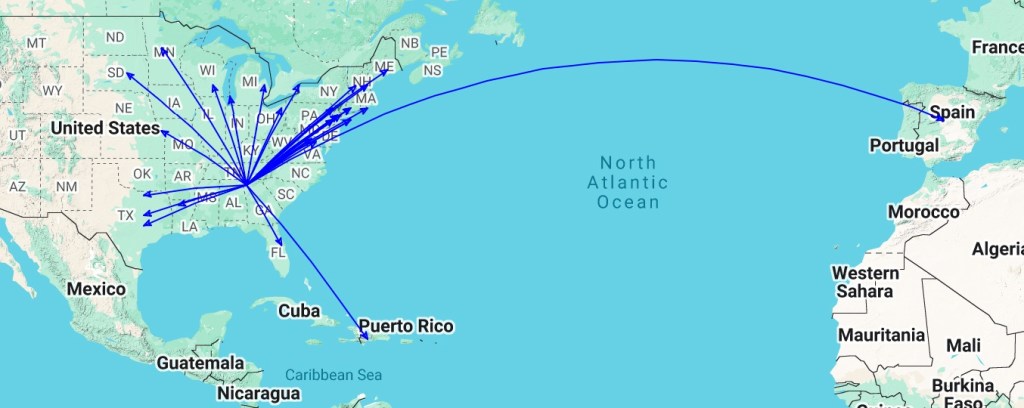
I only managed to make one CW contact hunting and activating. I could tell I was getting out as I showed up on HamAlert. Here is a QSO map of the activation.

Screenshot

If I remember correctly, I had issues last time I was at Cloudland. The important thing was I got out for a while and I had fun. It isn’t always about the numbers. Below is a video about the activation and my thoughts on the FT710. Stay tuned es 73 Scott

Moving things around

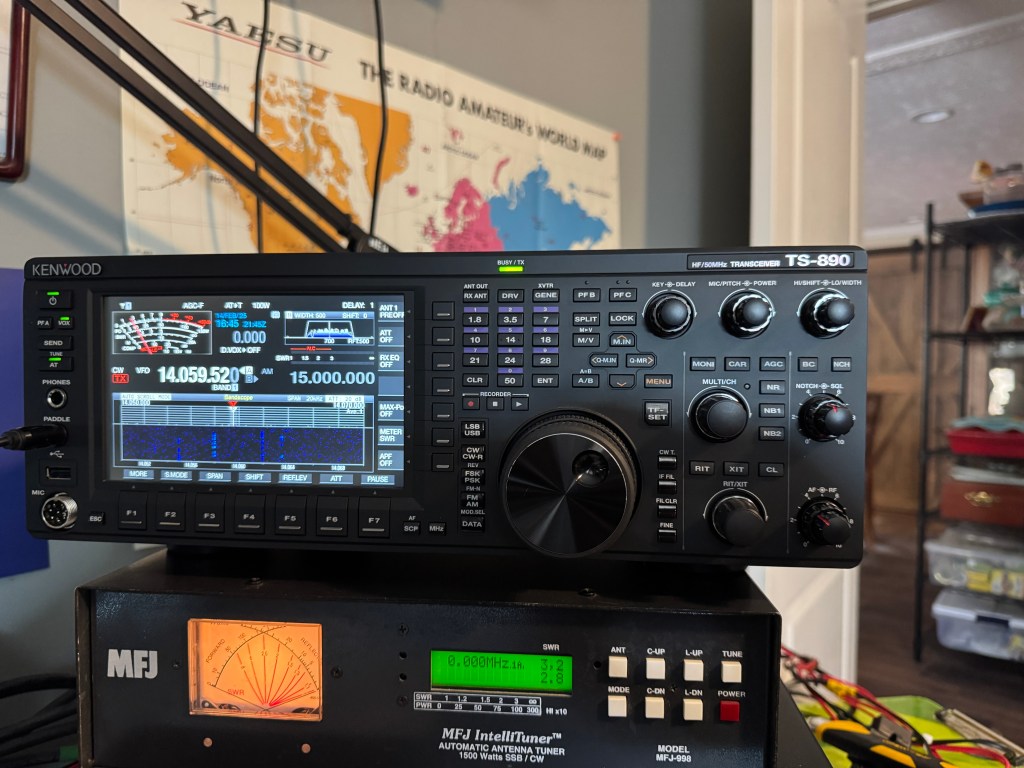
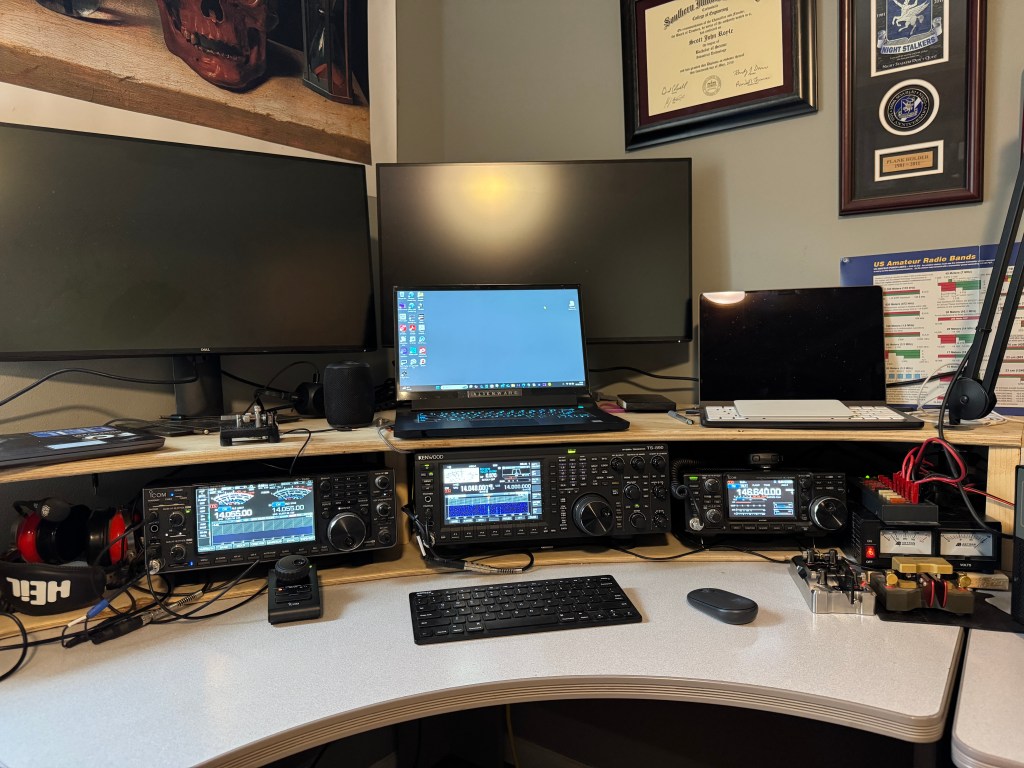
Its been a busy 2025 so far. I have been involved with MARS and that by itself has kept me occupied. I decided to change the the shack around a little to better meet my needs. I pulled the IC-7300 out of the line up and replaced it with a Kenwood TS-890s. The IC-7610 was shifted to the left which is now pretty much dedicated to MARS stuff. The TS-890s will be for everything else. I have both of my paddles hooked up to the 890 along with my Heil PR-781 microphone. I haven’t had a chance to use the 890 much but it is one heck of a radio. It is a very enjoyable radio. I am hoping to get back into CW this year. Last year was not a good year in general for radio and so far this is looking better. I want to get my code speed up. Rounding out the shack lineup is an IC-9700 for FM/DSTAR stuff.

So what about the IC-7300? That has gone back to being a field radio. That is where I enjoy it most. I also have a Yaesu FT-710 Field that is my other field radio. Over the years, I have found that I prefer big radios with better controls when I am in the field. Both radios can go down to QRP levels and if needed I can crank the power up to match band conditions. I find myself operating in the 20-35 watt range mostly and these radios can do that all day long even with digital modes like FT8.

I still have an Icom IC-705 and an Elecraft KX2 for the occasional day trip. If I am at a park, I am in my truck and I can carry a big radio 40 feet to a picnic table. I do like my little radios, but they do not see as much use as the big ones.

I have a new project I am working on. I am building a T3FD antenna to use with ALE.

Mine will be 177′ long and it will be 90 degrees from my OCF dipole. That will give me an antenna oriented north-south (OCF) and one east-west(T3FD). In order to have the space for the antenna I had take down a few trees.

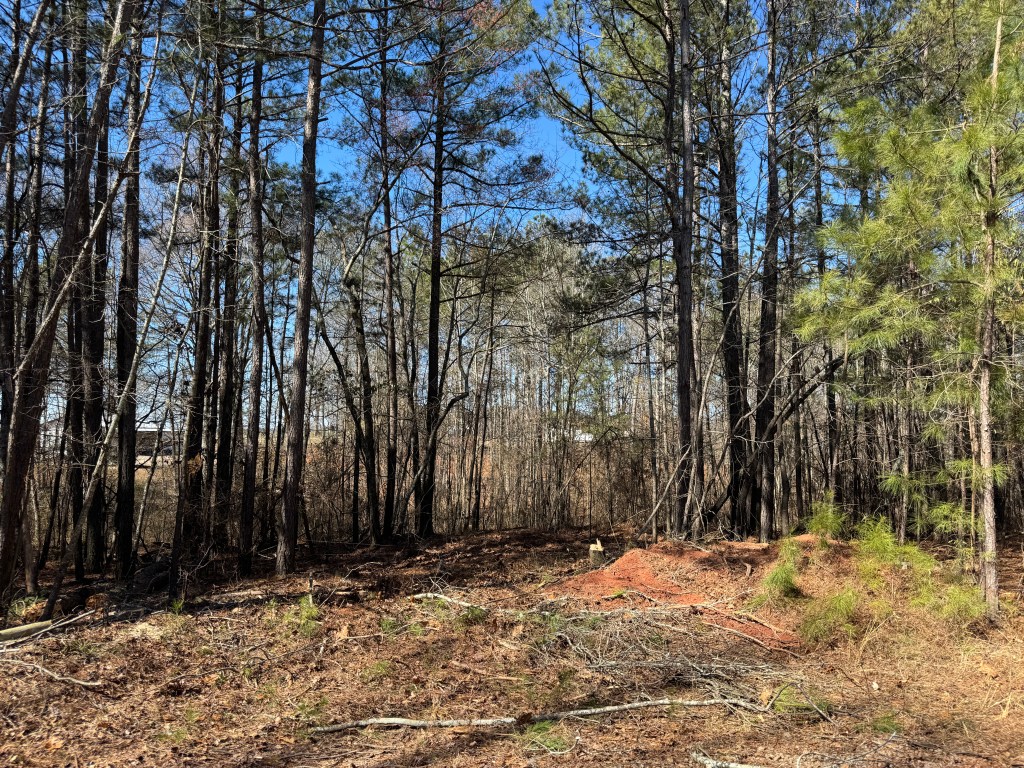
After the tree removal it looked like this.

During the last windstorm one nearby pine blew down creating a widowmaker.

These are fairly dangerous and I had to be very careful. The break was about 6′ off of the ground. Even though it looks straightforward, when the tree came down it broke into 3 pieces and actually fell back toward the stump. It was good I had an escape route planned.

The antenna will go over the top of the house, and attach to a red maple.

It will take me a couple of months to gather all the supplies I need for the antenna. Being on a fixed income doesn’t always fit into the “I want it now!” mindset.

As I write this I am recovering from a stomach bug, which can lay you out for 1 or 2 days. Another project I am working on is a mount for my Diamond RHM12 antenna. I hope everyone is doing well, that this year is better than the last, and I get the opportunity to work you. 73 de Scott

Changes

Life is full of changes. Some are expected and some are not. Over the past couple of weeks I have had some changes for the good. One is that 2025 is shaping up to be a better year than 2024. My wife and I had some trials and tribulations which hampered my radio-activity. We had deaths, surgeries, and a few other health issues that slowed us down. This year, things have appeared to clear up and I am already enjoying more amateur radio activity.

To start off, I have had another shack shake-up. In a prior post I had my SPE Expert 1.5K FA up for sale or trade. It is a great amp but I needed an amp that would do MARS and SHARES frequencies so I ended up with an SPE 2.0 K FA. When I get back from Hamcation, I had a trade offer. My amp for a TS-890s. I have never owned a Kenwood HF radio so I thought I would give it a go. The trade went smoothly.

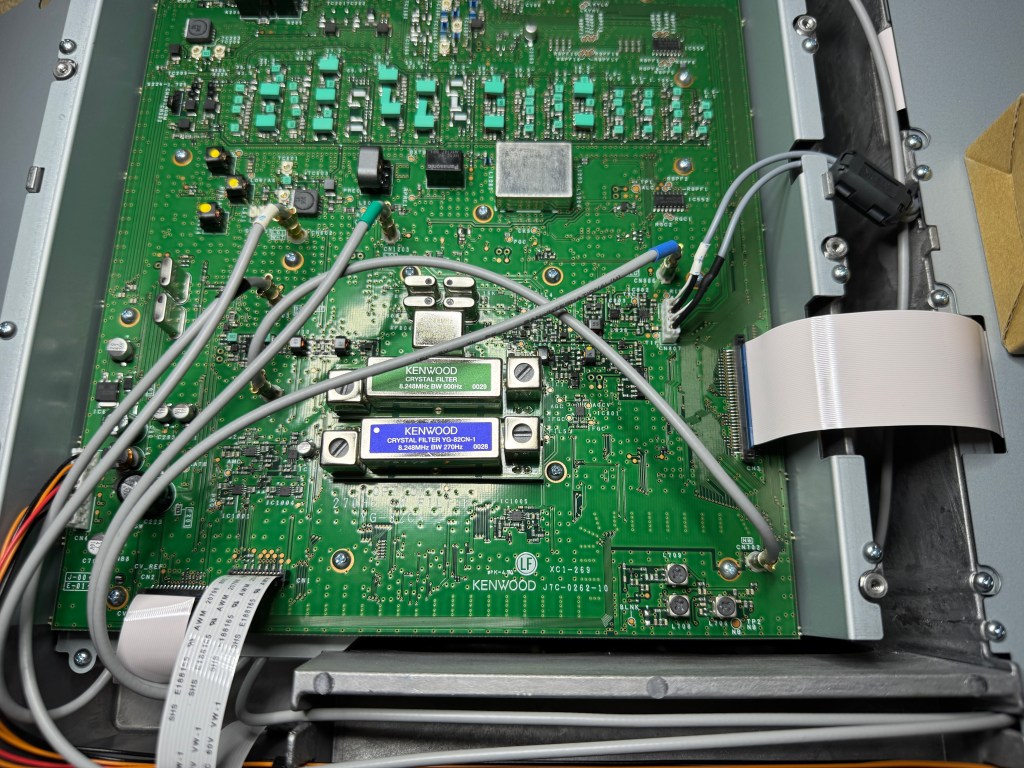
Before installing it in the shack I added the 270 Hz Roofing Filter and while I was inside, I did the MARS modification. I do not intend to use this radio for MARS, but in pinch, I am ready. My intention is to use the radio for fun and CW. I located it front and center on my desk. The IC-7610 was moved to the left which is where I set up for MARS operation. The 7610 plays very well for MARS.

As you can see in the above photo, I am using a Windows machine for radio control and logging. I really enjoy my Mac for everything else but when it comes to things radio, Windows machines are easier.

This weekend was the ARRL DX contest and the CW bands were crowded. this gave me a good opportunity to test the TS-890s. It performed very well.

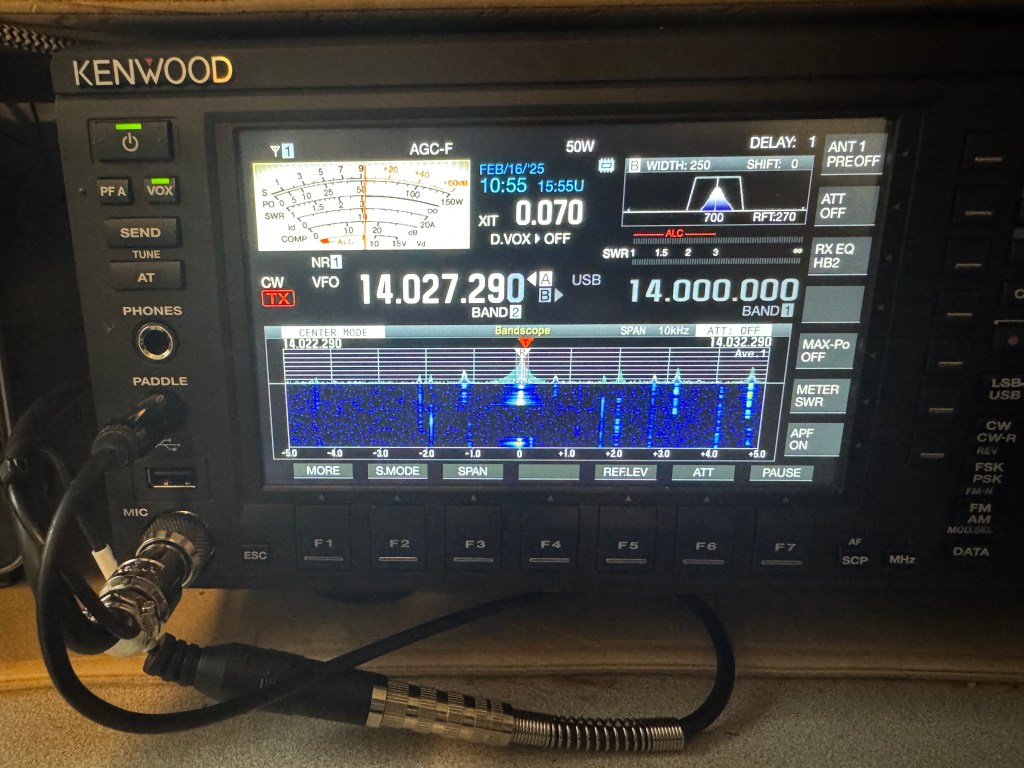
The scale on the waterfall is 5 KHz on either side of the frequency. I had the 270 Hz Roofing Filter and a filter bandwidth of 250 Hz. The TS-890 easily blocked an adjacent S9+10 signal less than 500 Hz away. Even at less than 200 Hz away I could easily copy the target signal though there was some ringing. That is pretty impressive.

I am hoping to get back into CW this year. I made about 10 POTA contacts this morning with the TS-890s. It is a very pleasant experience. The TS-890s has more buttons and controls than my IC-7610 and even though I think the 7610’s ergonomics are great, The TS-890s’ is better. The 890 is a big radio and it is heavy. It’s built like a brick…

Tools of the trade for CW are my Begali Magnetic Signature and Sculpture Swing.

I joined SKCC last year but didn’t do much because of stuff. I hope to do better this year. A lofty goal I have in mind is to get my CW above 25 wpm. I think I am close. I need to practice. Hopefully this year will allow that to happen.

I hope everybody else is doing well and I hope to hear you on the air. I have a couple of camping trips coming up which should be me and the key trips. The IC-7300? It has gone back to being a field radio. Which is one arena it really shines. 73 – de Scott

Winter Field Day 2025

It was another fun Winter Field Day. Our club, we like to do 3 things: 1) we like to talk, 2) we like to eat, and 3) every once in a while we like to talk on the radio. This year was no different. We had a lot of fun, ate good food, and played on the radios. I think it’s the non-competitive spirit that helps us brave the cold weather. And it was cold this year with temps in the 20’s and 30’s. Not only does this tax our physical comfort, it also taxes our equipment.

Coax cables and extension cords were stiff and fingers went numb but we managed to get 4 stations on the air. I operated separate from the group to try to Get multipliers on JS8Call. I also copied the WFD bulletin and used Winlink to send and receive email. We had one member attempt to make a satellite contact and while he could hear other stations, it appeared no one was connecting. This year we ran QRP. Which was fun. Let me run through the gear and tell you how things worked.

The antenna this year was a 73’ inverted L with the vertical leg at 20 feet. This had a 60’ counterpoise connected to 1.5 KW Palomar Engineering 9:1 UnUn. I use the bigger UnUn because times when I run higher power (up to 40 watts) using digital, smaller UnUns get warm and saturated. This antenna works well down to 160 meters. I made contacts on different bands out to the west coast. A fail I had was I used a Chameleon RF choke next to the UnUn. It blocked all of the signal to the radio. Once I removed it, things were fine.

The radio was my new Yaesu FT-710. The radio worked well with no real issues. A quirk of the radio is the AF cuts the volume off louder than other radios. Sometimes when I am operating digital, I like to turn the audio volume real low so I can just barely hear it to keep tabs on what is going on. With the FT-710, it cuts off the volume while it is still louder than I like. Not a deal breaker. One of the benefits of operating a big radio QRP is the controls are easier to get to. While I prefer the ergonomics of Icom radios, the FT-710 is still pretty good. Another quirk with the FT-710 is the waterfall. It is not averaging like other radios, you have to adjust it manually. Overall, the radio performed well and compares favorably with the IC-7300. Either radio will equally get the job done. This radio feels more refined than my first one. It will be going on several more trips I have planned.

FT-710 accessories. I got the tuner issue worked out and my LDG tuner is playing well with the 710. I added Portable Zero rails which not only protects the sticky-outy things, but gives extra finger holds. I consider the rails a must have for portable big radios. Heil Proset Elite. I had to buy another headset for the FT-710 and the Elite was on sale at HRO. My Icoms use an electret mic which requires power. I already had an adapter from when I owned an FTDX10. I’ve been using Heil products for 25+ years and they are my goto. Mouse. I bought a Logitech M310 mouse to go the FT-710 thinking it might be easier to navigate through the menus. However, once I got the radio setup I was only changing a few things and found I didn’t use the mouse at all. I will probably not use a mouse with the 710 and I already found another use for it.

Maestro Evolve III laptop. I think I paid $122 for it. It works okay. It’s not zippy fast but all the software I used worked. It does appear to be RF sensitive though. During transmit, the mouse would freeze and sometimes the app window would close and open. What do you expect for a hundred bucks! One thing I did find annoying was the track pad. It was overly sensitive and would often treat a light touch as an “execute” function doing something I didn’t want it to do. My solution is to take the Logitech M310 mouse and use it with the Evolve III. A cool feature is I can run the Evolve off of my radio power supply or battery. Less “stuff” to deal with. The power plug for the Evolve also fits older Icom and Kenwood HT’s. The Evolve worked with my GPS receiver and I was able to easily sync the time for JS8Call. I will be taking this little laptop out again.

JS8Call. I think this will be the last time I use JS8Call. I was never fond of it and running a contest with it is almost a nightmare. For WFD, it doesn’t sync well with ACLog. People would send their Class and section info out without attaching a call sign to it so you would get something like 1O OH… and nothing else. That would be okay if only one person does it but when 2 or 3 others do it at the same time, you don’t know who is who. That and there wasn’t really enough JS8Call stations on the air to make it worthwhile. CW was the same for WFD. There were other contests going on. It appears the money maker for WFD is SSB. Which is interesting because the EmComm community relies heavily on digital modes.

As a group, we had a lot of fun. We always enjoy getting together. I had fun and I got to test my equipment. It is reassuring to have the knowledge that your equipment is ready. Even when I go on one of my FunComm trips, I load things up and go. I don’t have to check them because I already did. Final thoughts? Listening to the CW contests over the weekend reinvigorated my love for CW. I have been away from it while getting up to speed with MARS and SHARES, but there is still something to be said for the simplicity of me and the key. Hopefully, this will be a better year than last year, and I can get back into the swing of things. Stay safe, stay warm es 72 de Scott

Yaesu FT710 – Second Impression

Here is my first look at my second FT710. I will start with the settings I changed and then go over the list of issues I had with the first one. The first FT710 had the original firmware as it was new at the time. This one has several updates under its belt.

Settings/Changes

  1. T710,Taped Power Cables every couple of inches to reduce tangles.
  2. Added Anderson Power Poles to the power cable
  3. Turned off 3DSS
  4. Set waterfall span to 5K
  5. Set waterfall speed to slow2
  6. Set color to 6
  7. Set level to +3.5 dB, peak to level 2 and contrast to level 14
  8. Set tuner type to EXT
  9. Set Tuner/Lin Port to Linear
  10. Set keyer to Elekey B, repeat interval to 3 seconds, Weight to 2.7 and Pitch to 700Hz
  11. QSK – on
  12. Set MyCall to KK4Z and call time to 3 seconds
  13. Set Mic gain to 60 and Processor level to 65
  14. CW mode on
  15. Meter Detector to Peak
  16. Receive Audio SSB – Treble +3 Middle +5 Bass -2
  17. Receive Audio CW Treble +3 Middle +1 Bass -3
  18. Parametric Equalizer (processor on/off the same)
    1. E1 – Freq 300 Bandwidth 10 level -3
    2. E2 – Freq 1300 Bandwidth 2 level 10
    3. E3 – Freq 2400 Bandwidth 1 level 10
  19. Needs a 32gb (no larger) SD card. Scandisk Ultra SDHC UHS-I 32 GB works
  20. Mouse. Seems the only wireless mouse you can use with the radio is a Logitech M310. It does not appear to be in production anymore. I had to buy a renewed one. I got the mouse working and I think it is a good addition to the radio. It does make changing parameters easier and if you click on a signal in the waterfall, the radio will QSY to that frequency. I wasn’t sure how I was going to like using a mouse, but I think I like it.

Here are the issues from the first radio:

  1. Could not use LDG tuner with the radio — it was a surreptitious route to get a tuner to work. I started out with a different tuner, an LDG IT-100 which uses a different cable. I coupled the tuner with an LDG IC-108 cable. The cable is not listed as usable on the FT710. The other twist was setting the Tuner/Lin Port “Linear” instead of Ext Tuner. This little tidbit is not shared by Yaesu, I had to find it on an internet forum. To tune the antenna you push the tune button on the tuner (not on the radio) to get things going. This is where Icom shines. They have been using the same interface at least as far back as the IC-718 and the IC-706. A tuner I bought for my IC-706 MKIIG still works on my IC-7300 with the same cable and I can use the tune button on the radio. The other downside is you cannot use the FH-2 Remote pad when using the auto tuner as it uses the same port at the back of the radio. In addition, you cannot run an amplifier and an auto tuner at the same time. Icom has separate ports for the tuner and amplifier.
  2. No Portable Zero Rails – I use rails on all of my portable radios. Portable Zero now makes rails for the FT710.
  3. Could not use RT systems software – it took Yaesu until July 2023 to get the info to RT Systems. I have RT Systems software for almost all of my radios. RT systems software works fine now.
  4. Auto Notch — I don’t remember auto notch working on the first radio I had. It works now.
  5. Cannot edit/see QMB – another place where Icom shines. I can go into the memo pad (Icom’s QMB) and edit the entries.
  6. RJ45 mic connecter instead of Foster (Icom)- Foster connectors are more durable than the RJ45.
  7. Key clicks in the headphones using CW – They are still there but less pronounced. The CW is harsh sounding and can be fatiguing to listen to over long periods.
  8. WSJT software would change modes when switching bands
  9. Waterfall is not averaging like Kenwood’s or Icom’s. It has to be adjusted manually (and sometimes frequently)
  10. Filter only has 2 selections vs 3 for the Icom. Narrow which only has predefined values and wide which is adjustable. The Icoms have 3 selections each fully adjustable. Icoms can also adjust the filter shape (soft or sharp. The FT710 has contour and APF. Contour is like a soft notch filter and APF boosts the center frequency like a CW signal. Icoms have dedicated controls on the front panel while the Yaesu has a mix of front panel controls and menu items.

Even with all of its quirks, I like the little radio. Yaesu appears to have fixed most of its problems, at least enough to make the radio fun. I still believe this radio compares well with the IC-7300 and either will serve you well. If I could only have one, I would still go with the Icom. The Icom has a lower noise floor, the settings (ergonomics) are better, and it hears as well as the Yaesu (at least in my side by side test). For CW again, the edge goes to Icom. However, the Yaesu has its pluses. The FT710 has a slightly better audio quality let’s say more fidelity but in CW the tone is more harsh than the Icom. The Yaesu has a better attenuator with 3-steps instead of one. With the Yaesu, you can transmit CW while in SSB mode. I like the filter window on the FT710. I can see how changing the filter affects the signal.

Later this week I have Portable Zero rails coming. They are pricy, but I find them very useful on my field radios. I also have a Maestro Evolve III coming which I will setup software for the FT710 on it. I hope to have everything ready for Winter Field Day.

I think a major difference between the IC-7300 and the FT710 is settings. Yaesu gives you settings on top of settings, while the Icom gives you what you need. If you like to tinker and tweak, the FT710 is your radio. If you want to get down and operate, then Icom is the way to go. Out of the box, I had to do far less setting up with the Icoms.

Compared to the FTDX10. I owned an FTDX10 for about 18 months. If I bought one today, the cost would be about $600 more than the FT710. I’m not sure the FTDX10 is that much better than the 710. My primary use for this radio is for the field. More to follow es 73 de Scott

Deja Vu all over again

The 2025 promises to be a better year. I am looking forward to being more radio-active. I am also looking forward to more blogging and more vlogging. I am hoping to undertake some long term reviews. I have two in mind. One is going to be a Maestro Evolve III laptop computer. I know a lot of hams use them so I thought I would give one a whirl. My other project is going to be another Yaesu FT710, this time the field version. I last owned one about a year and a half ago, I traded it off after a few months of use. The radio was going through some growing pains and was probably not ready for prime time. My general thoughts back then was the radio was a likable and fun radio and compared favorably to my IC-7300. I thought I would give it another look and a fair shake since it’s been through a few firmware updates since its release in 2022.

I am hoping this FT-710 is more polished than my first one. I can see at least two firmware updates since my last 710 and the manual has been updated. Hopefully Yaesu cured those early issues. I picked up the radio yesterday. I plan on using it as a field radio for POTA activations as well as for Winter Field Day and Field day with my club. In general the IC-7300 and the FT-710 are comparable, each with their pluses and minuses. Whichever brand you are married to, either radio will probably serve you equally well. One reason I got this radio is there are many members in my club that use Yaesu radios. Having familiarity with the Yaesu system allows me to help them with their radio problems.

My initial thoughts are similar to the ones I had a year and a half ago. It is a likable radio and it has a certain fun factor. I am going through my past blog posts and YouTube videos to make list of things I found with my first FT710 and see if they have been corrected. I will also post the settings I changed on the new radio to suit me.

I like big radios when I go camping or even on POTA day trips. I like having the controls I use handy and if band conditions get ugly, I can turn up the power. I normally run 20-25 watts for CW and digital. The rare times I am on SSB, I may go as high as 50 watts. Another plus with a big radio is I can run digital modes all day long and it will not overheat the radio. I do have a couple of QRP radios and I do take them out for a spin every now and again; but I can just as easily turn my big radio down to 5 watts. I am looking forward to using it in the upcoming Winter Field Day. 73 de Scott

Well My Bags Are Packed, I’m ready to Go

The 2024 Hurricane Season started of slow but boy did it pick up steam. Right now, the country has been rocked by the devastation left by Hurricane Helene and now Florida is bracing for Major Hurricane Milton. There are lots of good people doing lots of good things out there. I want to give a shoutout to AmRRon and Grindstone Ministeries for all the work they are doing in the Tennessee/North Carolina areas. You can find out more about these organizations at https://amrron.com and https://grindstoneministries.com.

I have been blessed in that both of these powerful hurricanes missed me. Helene about 40 miles to my east and Milton several hundred miles to my south. Just because I got lucky doesn’t mean I should sit back and rest upon my laurels. Contrary to popular belief, ham radio operators in the affected area are typically not able to operate after a hurricane passes through. Their number one concern is the safety of their family and the protection of their property. Many have left the area and are holed up in a motel somewhere or are with friends/family. This is the time and the place for those not affected by the storm to lend a hand. With families and property safe and secure, amateur radio operators can travel to, set up and operate their portable stations, relaying valuable information to public safety and/or nervous families wanting to know that their kith and kin are safe.

For those able to deploy, preparations should start long before you leave hearth and home. Radios and coax need to be checked for proper operation, antennas checked for damage? Are all of your batteries charged, generators serviced, and solar panels operating properly? Is your vehicle ready: tires checked, engine serviced, lights work? Do you have enough fuel for your vehicle and your generators? Do you have a place to sleep and something to sleep on? Do you have water and do you have food? Always bring food and always bring water, regardless of what someone promises you.

And what about you? Are you in shape? When was the last time you were to the doctors? Do you have any conditions that may affect you and are they serious enough that not being near an emergency room might kill you?

I’m not young anymore and my days of traveling to a disaster areas are coming to a close. However, I am ready; I keep a running talley on my gear. How? I practice with my gear almost everytime I go to park or a campground. The same gear I use in a park is the same gear I use for a disaster. I know how it works and I know I have what I need. I call this FunComm, which to me, is practice for EmComm. My field radio stays packed and ready to go. My basic kit looks like this.

The top box contains my radio and associated gear.

The bottom box, contains my batteries, power stations and a couple of solar panels. I also have 2 larger solar panels that I would also bring. I do not always bring batteries with me for FunComm but I see that they are charged up several times a year. Two notes. 1) Check your gear. Out in a disaster, you probably won’t be able to get whatever it is you left behind. I recommend that when practicing FunComm, you go at least 20 miles away from home. That is about the distance too far to drive back home again — either make do or call it a bust. 2) Solar power generation is iffy. On a good day, a 100 watt solar panel puts out about 6 amps. Your radio at 100 watts output consumes about 18 amps. That means for every hour of transmitting, it requires 3 hours of solar power generation at max efficiency. Don’t forget, you will have to feed you laptop, lights, cell phone etc. Yes, a cell phone has other uses besides a phone. My battery box looks like this.

You EmComm types may chuff at Parks on the Air (POTA), but they know their gear, because they use it often. Take the time now. Check your gear, get it ready, get yourself ready, sometimes, when they need you, they need you now. My prayers are for those in the paths of Hurricanes Helene and Milton, and also for those souls who when the call came were ready. When the call comes, can you cry out “Here am I” 73 and God Bless de Scott

Shack Shakeup

I’ve been busy lately, doing a lot of things for a lot of different people and even having fun with the process. I have been making some changes to the way I operate and how I am adapting to such things as getting older. The first change is I have added the remote VFO IC-RC28 to the shack. In the photo above, I have the RC28 next to my paddles. I like it there as I am often cruising up and down a band when doing activities like POTA. It is more comfortable with the dial being more horizontal and it is also enough out of the way when I am using my desk — well, like a desk. Just to he left of the RC28 goes my mouse. Everything right there one, two, three.

Another change coming to the shack is a new (to me) amplifier. I am getting an SPE Expert 2.0K-FA amp. This amp is capable of 1.8 to 2.0 KW of power and is set up fro general coverage (includes outside the ham bands). I normally never use more than 1 KW so what this gives me is a lot of headroom. The 2.0 is about twice as heavy as the 1.5 which I currently own. With the additional cooling I will be able to run digital modes up to 1 KW. However, I normally do not need anymore than 100-200 watts for CONUS coverage. I am adding an amplifier interface cable to the IC-7300 so both radios can each run the amp with a push of a button. The SPE Expert 1.5K-FA will be up for sale shortly.

Antennas. I’ll be putting up a new antenna. This is be a 203′ terminated end-fed non-resonant antenna. This will be a very broadbanded antenna and will allow me to operate on 60 meters. I also have some field antennas coming and I will post about them on a different post.

Power.

I added a 100 Ah battery to the list of portable power options. This battery will give me a full weekend of operating. This battery will also provide back-up power when black-outs or brown-outs occur. I have another set of solar panels on the way. This country is heading towards power shortages as fossil fuel plants are beign shut down and not being replaced. However, our energy usage is continuing to increase. Several parts of our country are already suffering from these outages.

I do have a couple of field trips planned in the near future and of course operating from home.

The wonderful thing about amateur radio is there are so many ways to enjoy the service. I do not call amateur radio a hobby as it is a service even we can enjoy it like a hobby. Until next time, get out there and get on the air, or stay at home. 73 de Scott

Ham Radio 101 Basic Set-up

In one of the forums I visit there were a lot of questions about what radios and antennas to get for a new Amateur Radio Operator. I have bought/sold/traded many radios over my 29 years as a amateur radio operator and feel I have a pretty firm grip on what a basic setup would look like. I am not going to do a good/better/best list as I feel a good list will leave an operator wanting something better and a best list is usually cost prohibitive and can be technically advanced for most beginners. Better is “the just right”. This range is usually only a little more expensive then the good range and the equipment is still easy to use and has more than enough performance.

Primarily for this post, I will be concerned with Emergency Communications (EmComm). More specifically net operations using digital modes. The equipment list will be geared for either home or portable operation.

Radio. Whatever radio you choose make sure it is capable or 100 watts output and does not require a separate sound card. A sound card whether built into the radio or external is required for most digital modes used today. You want a 100 watt radio for 2 reasons: 1) The purpose is this setup is for EmComm. It may be critical for you to make the communications link with the net control station. Being able to run 100 watts even if for a short period of time is better than maxing out at 5 watts and not making the connection. 2) Digital modes have a high duty cycle. Running a 5 watt radio at 5 watts because they often have a very small heat sink, heat very quickly. A 100 watt radio can run at 40 watts all day long and not even get warm.

My choices.
The radio I recommend for new hams is the Icom IC-7300 at HRO. It is easy to use and setup, has a built in sound card, and the best metering for digital modes.

With the IC-7300 you can view all of the meters at once. Runners up are the IC-7100 at HRO and the Yaesu FT-710 at HRO . I find that the FT-710 and IC-7300 (I have owned/own both) hear about the same. I prefer the ergonomics of the Icoms better. With the radio I recommend Portable Zero RailsPortable Zero Rails to protect the radio and make it easier to handle.

Antenna Tuner/Match. I recommend an external antenna tuner/match. Most built-in tuners will match the impedance of an antenna up to 3:1, and external antenna tuner such as an LDG Z-11 Pro II or LDG Z-100A which will match up to 10:1. This is important if you are using a non-resonant antenna or one that is electrically short or long.

Antenna – Home. I have used many antennas over the years and I have developed my go to antenna list. For the home station, I have settled on either an 80 meter half wave dipole (~132 ft) or 160 meter Off Center Fed (OCF) Dipole (270 Ft). I have a slight preference for the OCF and they can be had in 80 meter versions. The 80 meter dipole can be homebrewed and the OCF dipoles can be found hereBuckmaster Antennas. It is important to note that most EmComm operations happen on the 40 meter and 80 meter bands. An 80 meter antenna will work reasonably well on 40, 20, and 10 meter bands but a 40 meter antenna will not work well on 80 meter. Bigger is better.

Antenna – Portable. I have used a lot of portable antennas over the years. I have narrowed it down to 3 favorites. The antenna I probably use the most is a 28.5 Ft random wire antenna with a 17 Ft counterpoise. It is easy to set up and works well 80-6 meters. If you look at my activations on this blog I have QSO Maps to show real performance. I will include a link on how to build the 28.5′ Random wire antenna. My second favorite is a Chameleon EmComm II Ver. 1 Chameleon EmComm !! ver.2. I usually set it up as a ~60 Ft antenna in an inverted L configuration with a 55 Ft counterpoise. This antenna performs very well on the lower bands to include 160 meters. The last antenna is somewhat of a specialty. I use it for SOTA or lightweight QRP operations. It is a 40 Meter OCF dipole that weighs a few ounces Chameleon OCF 40. I hang it about 10-12 Ft in the tree and sit below it using CW. Another antenna worth mentioning is my Frankentenna which is a multi configurable antenna and I will post a link to it. along with the antenna is Coax cable. Dual purpose field/home coax, RG-8X will work just fine. For home only then you can move up to RG-213 or LMR400.

Grounding. For the home, it is a very good idea to ground your equipment. There are lots of good sources on how to do that. I run a ground rod in the ground and ground my equipment to it. When I am not using my station, I disconnect my radios from mains power, my computer, and the antenna. I also have lighting arrestors on my coax.

Power Home. I use an Astron 30 amp switching power supply for my radios. I have also used a Samlex Power Supply with good results. In the field, if I have mains power or an inverter generator avaliable I use a Powerwerx 30 amp Power Supply. What I like about the Powerverx is it uses Anderson Power Poles for the connections. I put Anderson Power Poles on everything. The main advantage is they prevent cross wiring and the destruction of your radio. If mains power is not available, I have batteries and solar panels to power my radios and laptop. A note about generators. Be very careful about what generators you hook your radios up to. Home Depot or Lowes generators (the cheap ones) are not well regulated and can damage your equipment. If your have to use one of those, run your radio through a deep cycle marine battery and use the generator to charge the battery.

Computers and software. Running amateur radio apps does not require a lot of horsepower or memory. Most Intel I-3 or I-5 processors will do fine. Celerons will work though I am not fond of them. For operating systems your choices are usually Windows or Linux. I run Windows 11 on my machines. For apps, you should have FLDigi, FLamp and FLmsg. For versatility, I use laptops. Keep your operating systems and apps up to date, don’t muck with the machine too much, and you should be fine.

Go boxes. There’s a lot of info out there about building Go Boxes or setting up your radios in a rack mount case. It’s fine until you have to work with it in a limited space – been there, done that. What I use is a Dewalt Tough System tool box that holds just about everything I need except for a laptop. Here is what it looks like.

This should be enought to get you started or at least thinking about your next steps.