POTA FunComm with EmComm Practice

This past weekend I spent some time at Florence Marina State Park US-2174. It had been a while since I had a chance to get out and I felt the need for a shakedown cruise. Peak hurricane season is just a couple of weeks away and I wanted to make sure I was ready. While most people connect hurricanes with the summer season, September is acutally the busiest month.

I usually work FT8 as a digital mode when doing a POTA activation but I wanted to test out my other modes making sure my radio system (radio, computer, antenna, etc) was in good working order.

I have been busy the past couple of months working on some projects on the EmComm side of the house and I haven’t had the opportunity to test my portable gear. In particular, I haven’t had the chance to use my Elecraft K3 with digital modes. It is a great radio so I took it and the manual with me. For EmComm, always bring the manual. My antenna was my 28.5′ random wire vertical with a 17′ counterpoise. This is a good antenna for parks as it does not put wires in the trees nor holes in the ground. Being a vetical, it does tend to be more Dx than local. If I need more local operation, I have other antennas I can use. Attached to the antenna is a homemade 9:1 UnUn and a 1:1 current BalUn. Coax was RG-8x fed into the back of the K3. The auto-tuner on the K3 is fairly wide ranging so an external tuner is not needed. This configuration allowed me to work 40-10 meters easily. My spare radio was an Elecraft KX2.

I used mains power at the campsite however, my two Honda generators will power the camper and the radios.

Band conditions were poor, you can’t pick the conditions when responding to a disaster. I booked this campsite a couple of months in advance. When I deployed to Hurricane Katrina, I had similar band conditions. You work with what you got.

I spent some time setting up the radio to run on digital, it took me about 10 minutes to get it sorted. I worked through my apps starting with Winlink. I didn’t update my propagation chart, so I had to download it via radio. I had to hunt around to find a node to connect to. Band conditions again made things difficult. I did manage to connect to a node in TX on 20 meters. I was able to get the report and send an email. Next up was VarAC. It started right up and I sent a few beacons and checked it on PSKReporter.

I had 1 bar on my cell phone and was able to get the map copied before it winked out again. Vara is a great mode and has weak signal propagation very close to JS8Call. From my experince, it is less than 1 S-unit difference.

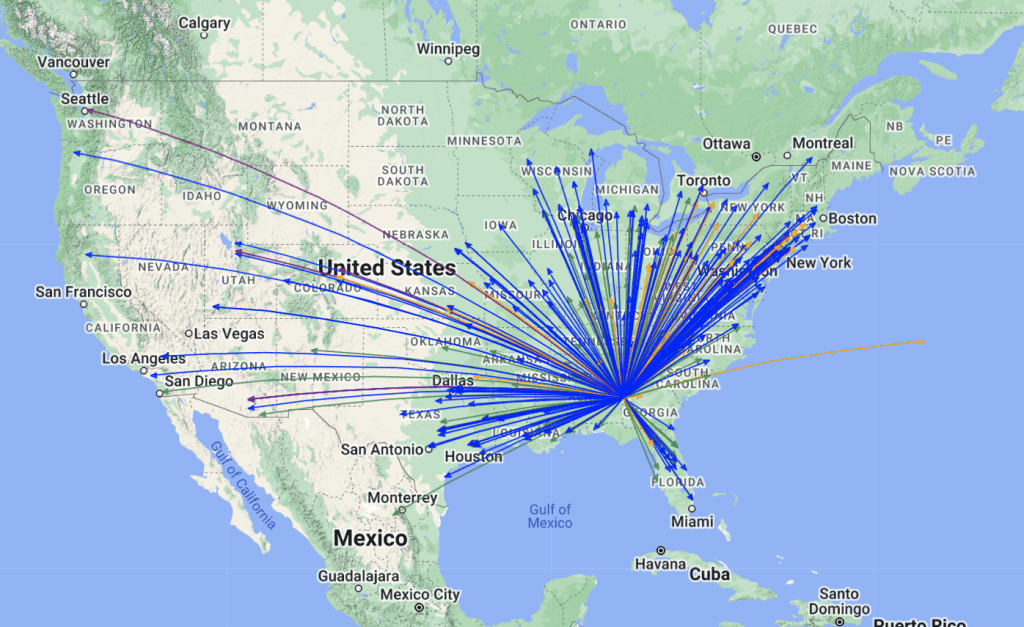
Later that evening, I checked into one of my EmComm nets using FLdigi. Along with FLdigi, I use FLrig, FLmsg and FLamp. All worked well except that the band condtions prevented 100% copy. The rest of the time I was on FT8. the bands were up and down and the only band producing anything was 20 meters. I only made 161 contacts. On a weekend with normal band conditions I would get between 400-600 contacts. I decided to call it quits late Saturday afternoon and head home. Besides the poor band conditions, it was oppressively hot and humid. There is only so much you can do inside a small camper. Here is the QSO map for the trip.

As you can see, really strange propagation. It was almost like someone built a wall SW to NE. My antenna is normally omni-directional.

It was a good trip and I managed to check all the boxes I needed to check. if you are involved in EmComm or if you live in an area prone to hurricanes, now is the time to check your gear. For those living in a hurricane prone area, make sure you have a spare antenna, tucked away somewhere. Take it out check it and run it with your radio on the bands you think you will be using. Hurricanes can and will take out you antenna farm. Don’t forget to check out the video. Stay safe and stay ready de Scott

Ham Radio 101 Basic Set-up

In one of the forums I visit there were a lot of questions about what radios and antennas to get for a new Amateur Radio Operator. I have bought/sold/traded many radios over my 29 years as a amateur radio operator and feel I have a pretty firm grip on what a basic setup would look like. I am not going to do a good/better/best list as I feel a good list will leave an operator wanting something better and a best list is usually cost prohibitive and can be technically advanced for most beginners. Better is “the just right”. This range is usually only a little more expensive then the good range and the equipment is still easy to use and has more than enough performance.

Primarily for this post, I will be concerned with Emergency Communications (EmComm). More specifically net operations using digital modes. The equipment list will be geared for either home or portable operation.

Radio. Whatever radio you choose make sure it is capable or 100 watts output and does not require a separate sound card. A sound card whether built into the radio or external is required for most digital modes used today. You want a 100 watt radio for 2 reasons: 1) The purpose is this setup is for EmComm. It may be critical for you to make the communications link with the net control station. Being able to run 100 watts even if for a short period of time is better than maxing out at 5 watts and not making the connection. 2) Digital modes have a high duty cycle. Running a 5 watt radio at 5 watts because they often have a very small heat sink, heat very quickly. A 100 watt radio can run at 40 watts all day long and not even get warm.

My choices.
The radio I recommend for new hams is the Icom IC-7300 at HRO. It is easy to use and setup, has a built in sound card, and the best metering for digital modes.

With the IC-7300 you can view all of the meters at once. Runners up are the IC-7100 at HRO and the Yaesu FT-710 at HRO . I find that the FT-710 and IC-7300 (I have owned/own both) hear about the same. I prefer the ergonomics of the Icoms better. With the radio I recommend Portable Zero RailsPortable Zero Rails to protect the radio and make it easier to handle.

Antenna Tuner/Match. I recommend an external antenna tuner/match. Most built-in tuners will match the impedance of an antenna up to 3:1, and external antenna tuner such as an LDG Z-11 Pro II or LDG Z-100A which will match up to 10:1. This is important if you are using a non-resonant antenna or one that is electrically short or long.

Antenna – Home. I have used many antennas over the years and I have developed my go to antenna list. For the home station, I have settled on either an 80 meter half wave dipole (~132 ft) or 160 meter Off Center Fed (OCF) Dipole (270 Ft). I have a slight preference for the OCF and they can be had in 80 meter versions. The 80 meter dipole can be homebrewed and the OCF dipoles can be found hereBuckmaster Antennas. It is important to note that most EmComm operations happen on the 40 meter and 80 meter bands. An 80 meter antenna will work reasonably well on 40, 20, and 10 meter bands but a 40 meter antenna will not work well on 80 meter. Bigger is better.

Antenna – Portable. I have used a lot of portable antennas over the years. I have narrowed it down to 3 favorites. The antenna I probably use the most is a 28.5 Ft random wire antenna with a 17 Ft counterpoise. It is easy to set up and works well 80-6 meters. If you look at my activations on this blog I have QSO Maps to show real performance. I will include a link on how to build the 28.5′ Random wire antenna. My second favorite is a Chameleon EmComm II Ver. 1 Chameleon EmComm !! ver.2. I usually set it up as a ~60 Ft antenna in an inverted L configuration with a 55 Ft counterpoise. This antenna performs very well on the lower bands to include 160 meters. The last antenna is somewhat of a specialty. I use it for SOTA or lightweight QRP operations. It is a 40 Meter OCF dipole that weighs a few ounces Chameleon OCF 40. I hang it about 10-12 Ft in the tree and sit below it using CW. Another antenna worth mentioning is my Frankentenna which is a multi configurable antenna and I will post a link to it. along with the antenna is Coax cable. Dual purpose field/home coax, RG-8X will work just fine. For home only then you can move up to RG-213 or LMR400.

Grounding. For the home, it is a very good idea to ground your equipment. There are lots of good sources on how to do that. I run a ground rod in the ground and ground my equipment to it. When I am not using my station, I disconnect my radios from mains power, my computer, and the antenna. I also have lighting arrestors on my coax.

Power Home. I use an Astron 30 amp switching power supply for my radios. I have also used a Samlex Power Supply with good results. In the field, if I have mains power or an inverter generator avaliable I use a Powerwerx 30 amp Power Supply. What I like about the Powerverx is it uses Anderson Power Poles for the connections. I put Anderson Power Poles on everything. The main advantage is they prevent cross wiring and the destruction of your radio. If mains power is not available, I have batteries and solar panels to power my radios and laptop. A note about generators. Be very careful about what generators you hook your radios up to. Home Depot or Lowes generators (the cheap ones) are not well regulated and can damage your equipment. If your have to use one of those, run your radio through a deep cycle marine battery and use the generator to charge the battery.

Computers and software. Running amateur radio apps does not require a lot of horsepower or memory. Most Intel I-3 or I-5 processors will do fine. Celerons will work though I am not fond of them. For operating systems your choices are usually Windows or Linux. I run Windows 11 on my machines. For apps, you should have FLDigi, FLamp and FLmsg. For versatility, I use laptops. Keep your operating systems and apps up to date, don’t muck with the machine too much, and you should be fine.

Go boxes. There’s a lot of info out there about building Go Boxes or setting up your radios in a rack mount case. It’s fine until you have to work with it in a limited space – been there, done that. What I use is a Dewalt Tough System tool box that holds just about everything I need except for a laptop. Here is what it looks like.

This should be enought to get you started or at least thinking about your next steps.

Fast Foods for Fast Times

The phone rings at 0400 hrs local and your EmComm Leader is telling you it’s time to deploy to BFE Florida after a Cat 4 hurricane. But wait! I’m all out of Mountain House Freeze dried beef stroganoff; what will I eat!

There are plenty of off the shelf foods that are perfectly suited for living in the rough. Before I delve into the foods, let’s talk about calories. Sustainable intake or calorie intake that will not cause weight loss would be in the neighborhood of 2,000 to 3,000 calories a day. That could be one meal at Wendy’s. Of course calorie intake would have to go up as your activity increases but here is an example. I walk 4 miles most mornings at a sub 15 minute mile pace which is faster then most people walk. I burn about 105 calories a mile. To give context, my 4 mile walk is about equivalent to a Snickers Bar.

So what do you need to be self sustaining? There probably won’t be much power available so foods that store without refrigeration would be high on the list. One example is peanut butter or an equivalent. Two tablespoons of peanut butter is about 200 calories, couple that with a tortilla and you are up to about 300 calories or more. Two peanut butter/tortillas per meal and you have 1,800 calories per day. Crackers are a good source for calories. Five saltines are 70 calories and an MRE Cracker packages contains 2 crackers for 180 calories. Add some MRE Cheese Spread with Bacon and you are up to 300 calories. I am former Army and some of this is field “comfort” food.

Another favorite is GORP or Good Ole Raisins and Peanuts. this harkens back to my backpacking days. I often add chopped dates and M&M’s to it. Mandelbrot or Mandel Bread is another high calorie treat.

Before I move on to my list of deployment foods I want to discuss water.General Guidelines are 1 gallon per person, per day. That is a maintenance amount. Add in heat stress, washing (body clothes, utensils) and the number goes up. While in the Army we did a training exercise in the desert. It was over 100 degrees and we were performing strenuous activity. I was almost drinking a gallon of water an hour. Plan on 2 or more gallons of water per person, per day. Jerry can water often develops an after taste so something like Stur or Pur Aqua favoring helps.

Here is a list of foods I consider when getting ready for a deployment. I also use this list when camping and doing something like a POTA activation. Most everything on the list can be had at a grocery store and some like Walmart are open 24 hrs. One last word of advice before I present the list. Do not wait until you are in the field before trying some of these foods. One or more may not agree with you and your suffering may be compounded by poor “facilities”. Here is the list:

B&M Brown Bread
Pilot Bread
Peanut Butter
Jelly
WeetaBix (cereal)
Underwood Chicken Spread
Single Serving Spam
Saltine Crackers
MRE Cracker (Amazon)
MRE Cheese Spread (Amazon)
Flour Tortilla
Wasa Sourdough Crispbread
Foil packed chicken (usually by the tuna packets)
Fresh Fruit
Fruit Cups
Dried Fruit
Raisins
GORP
Granola bars
Ghee (clarified butter)
Instant Coffee
Instant Oatmeal
Ramen Noodles (single Serve)

Remember to include enough protein in your diet. I once did a supply run in south Florida after a hurricane and for 2 days I ate nothing but peanut butter and jelly sandwiches, I was ready for some meat. By the time I got back to civilization (with electricity), Even a fast-food burger sounded gourmet. A lot of this stuff keeps well so you can store some at the house. It’s also a lot cheaper. Stay safe and 73 – Scott

By the Hand of God at US-2173

I book my campsites often months in advance to ensure I get a good campsite. This particular trip was postponed twice due to typical life events that take precedence over having a little fun. Even this trip was not without its own issues. My wife and I forgot that this weekend was also Mother’s Day and unknown to us at the time of the booking was that there was going to be a 4 major Coronal Mass Ejections (CME) making an earth strike during the trip.

The last time I witnessed solar storms of this magnatude, I was in Gulfport MS doing EmComm for my Church in the aftermath of Hurricane Katrina. It was a humbling experience and it shaped my EmComm Philosophy.

I use the same gear for EmComm and FunComm. The equipment gets tested and exercised, and I remain proficient in its use. I also have an understanding of its strengths and weaknesses.

Most trips I take my go box.

It stays packed and contains everthing except a battery or generator to operate. I do keep a small switching power supply for mains power when it is available. Here is a look at the inside.

I have built rack mount or shelf type go boxes and in general, I do not like them. I have deployed to real disasters and found what I have here works the best for me. I do this enough that I am up and running in minutes. One thing I like is the versatility of being able to adapt my radio to the space I have to set up in. Your Milage May Vary, but for me and my 26 years in EmComm; this works best for me.

This weekend was spent at F.D. Roosevelt State Park (US-2173) near Warm Springs GA. The park was named after Franklin Delano Roosevelt. He suffered from Polio and often would travel to Warm Springs GA for hydrotherapy. He built a residence there often referred to as “The Little White Hose”. During his presidency, he established the Civilain Conservation Core (CCC) during the Great Depression. This provided jobs to young single men to help families who had difficulty finding jobs. The CCC built much of the park.

The park contains 9,049 acres (largest in GA) and is built along the Pine Mountain Ridge. It is the southern most moutain range east of the Mississippi River. The highest point is Dowdell’s Knob at 1,395 ft and is a popular POTA and SOTA (W4G/CE-004) site. I took the Radio Flyer and stayed at the campgrounds near Lake Delano.

I arrived there right at 1300 hrs eastern (check-in time) and quickly got myself settled and ready to go. I knew the solar storms were coming and that my time maybe short. I wanted to finish my kilo here (#6) and needed 310 QSO’s. I had already postponed this trip twice so I was a little edgy. My gear for the trip was my 28.5′ Random Wire Antenna with the Peter my IC-7300. I had my Lenovo Thinkpad T-14 laptop and used mains power. The nice part about the antenna besides it performance, is I get zero complaints from park employees. No wires in the trees nor holes in the ground.

Friday’s band conditions were okay. There was lots pof QSB and I stuck with FT8 (35 watts). CW in these more rural parks can be iffy and this go I needed quantity. I started at 1430 hrs eastern and by oooo hrs Saturday (Friday Night) I had 134 QSO’s and when I quit at 2315 hrs I had a total of 230.

Saturday morning, after a quick breakfast I started up again at 0730 hrs. I operated until 1140 hrs when the bottom dropped. Luckily, I ended up with 338 QSO’s including 3 that were mader after the CME hit.

I decided my time would be best spent at home to spend Mother’s Day with my Lovely Bride so I packed up and headed for the house. My stats refelected band conditions and even though I made quite a few contacts, I only had three DX entities: Alaska, Canada and Mexico. I made contacts in 40 of the 5o states.

Operating this weekend reminded me that as reliable as HF commnications can be, it does have its Achilles Heel. For those in EmComm, never stop practicing, refining your techniques, or keeping your gear in order. For everyone else, it’s just another day in paradise. 73 de Scott

Going Mobile

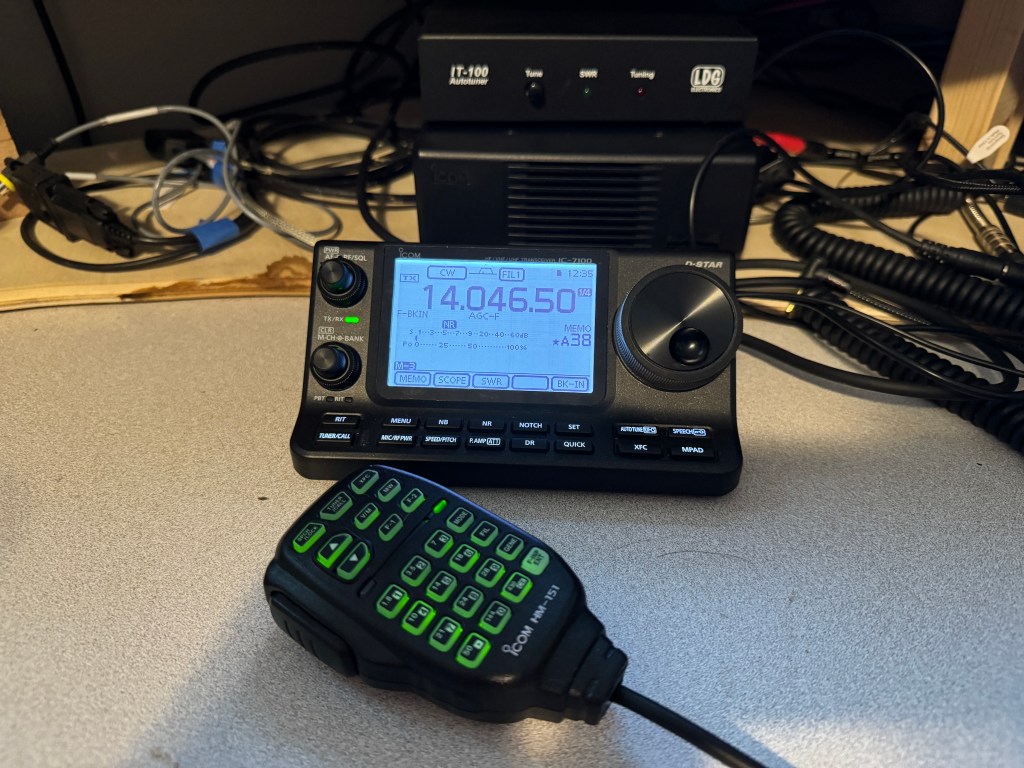
Goin’ Mobile, Keep me Movin’ (The Who). After recovering from my rove I decided to install the IC-7100 in my truck. I like the idea of being able to pull into a park and operate with a minimum of setup. The 7100 is nice in that it includes HF/VHF/UHF. Here are the bits an bobs I used to get this going.

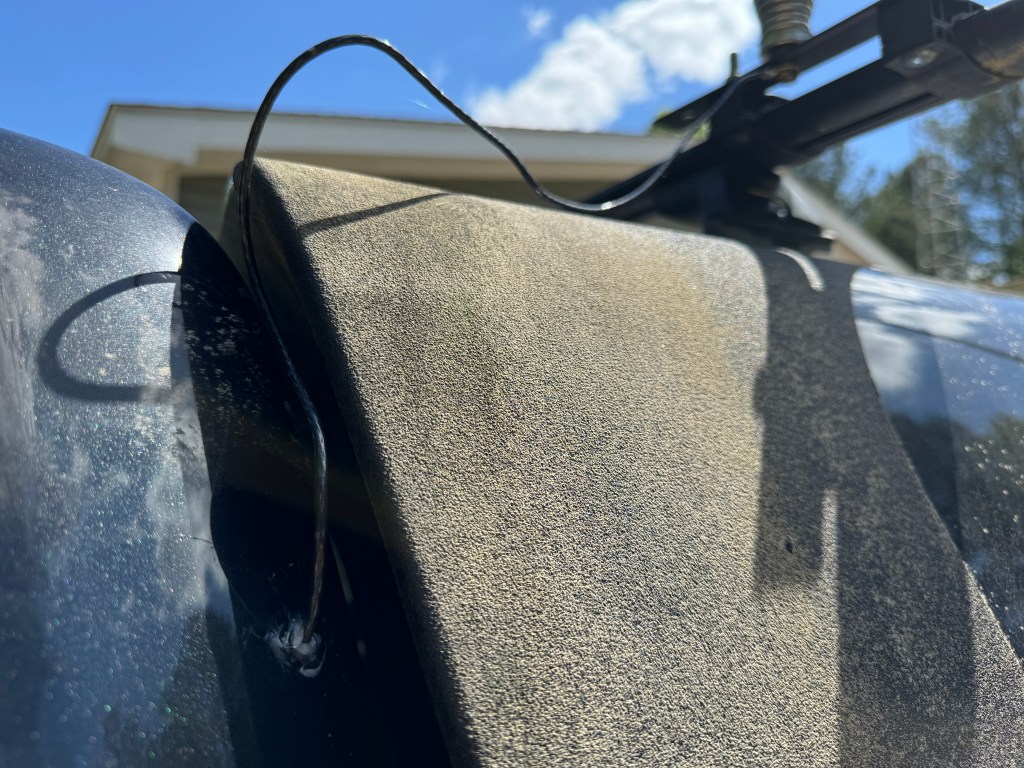
For a tuner, I used Icoms new AH-730. It replaces the AH-4 and is a much nicer unit. The AH-730 and the AH-4 are actually couplers much like the SGC SG-237. They are designed to connect directly to the wire antenna. Coax is only used between the radio and the tuner. I ran a 12 ga stranded wire from the tuner to the antenna which is mounted on my camper roof rack. It is a standard 102″ stainless steel whip. I only had to drill a small hole through the cab sheet metal, add a grommet and a little RTV and I’m done. I drilled an additional 3/8″ hole in the plate where the whip antenna attaches to the truck so I can easily add a horizontal wire for low band NVIS. All I need to do is attach the wire to the truck, stretch it out to a tree, hit the tune button and operate.

Once inside the wire is covered by the trim until it hits bottom and then is routed to the tuner.

The radio and tuner lie in the seat tray under the rear seat. Power from the battery and the UHF/VHF antenna lead are already there from the ID-4100 which was located there. All I had to do was run the control cable from the radio to the control head, attach the antenna to the tuner, the control cable from the radio to the tuner, and add some grounds. If need be, the radio can be easily removed to use outside of the truck.

The control head is mounted on my center console with a cup holder mount. I found this is a nice location for the control head, it is easy to see and manipulate the controls. Plus I also have the DTMF microphone for it. In a pinch I can run CW.

I haven’t done a lot of testing yet, but from my experience with a IC-706 MKIIG/AH-4 combo, things will be fine. Right now I have a bit of work to do on my property which unfortunately, takes priority over radio, but hopefully soon I will be able to get out to a park.

Another thing I haven’t talked about was this mobile setup also works well for EmComm. I can use the truck’s battery or one of my others to run the radio. Adding wire to the antenna will help on the lower bands; plus, the whole system is easy to deploy. Let’s hope I don’t have to use it. 73 de Scott

The Happenstance Rove

Happenstance: a chance circumstance. That is how it started out. I recently sold one of my radios and for giggles I thought I would check out QTH.com to see if there was anything I just had to have (Danger Will Robinson). I stumbled across a nice IC-7100 and thought I could install it in my truck to make quick POTA activations a little easier. The ad looked good and the call sign sounded familiar. I checked the seller out on QRZ.com. I do this with every ham radio transaction to reduce the opprtunity of being scammed. Low and behold! the seller John KX6F, is an old army buddy of mine. We served together in the 101st Airborne Division in C/158 TF 160. That was 40 years ago and I hadn’t seen him in at least 15 years. John is a good guy and was a major influence to me becoming a ham. I served with him from about 1980-1983 when I was transferred to Germany. Life and stuff took over and I was finally able to get licensed in 1995.

I sent John an email asking if I could pick up the radio in person and take him out to lunch. He told me that he suffered a severe stroke a couple of years ago and that dining in would be a better option. No problem. On Monday 04/22, I asked when would be a good time to come. He said Tuesday would be good. I had one night to plan a trip. He lives about 5 hours away from me so I thought I would turn this into a rove. I decided on two nights of camping and 5 parks in 5 states. The XYL had a hip replaced so I hadn’t been out in a while, it was time to stretch my legs. Here is a map showing the stops.

Blue is day one, red is day 2 and green is day 3 and the trip home.

#1 Clarskville TN. First stop was John’s. We had pizza for lunch and reminisced about old times. John looked good and was as jovial as ever. I was glad I made the trip. He and his wife were very gracious. After about an hour and half, I could tell it was time to go. The radio is in great shape and I am sure I will enjoy it.

KK4Z with KX6F

My new radio at the QTH

From John’s house I drove to Lake Barkley State Park (US-1284 and #2 on the map). I spent the night there in a very nice campsite. Right at dusk, a Barred Owl flew into my campsite. He was less than 20 feet away from me at eye level. Once we made eye contact, he flew off to another perch – silent as a ghost. All the states on this trip were new activation states for me so I made sure I had enough contacts for a valid activation. I was prepared to do either CW or FT8 but due to band conditions, it looked like FT8 was going to be the weapon of choice. I made 20 contacts and managed to work Australia, Canada and France.


Wednesday morning I broke camp and headed toward Ft Massac State Park (US-0993 and #3 on the map) just over the line from Kentucky. It was a nice park inside of the town of Metropolis. I found a spot with clean restrooms nearby and enough room for my truck and camper. There were a lot people using the park to exercise. I used FT8 to make 20 contacts on 30 and 10 meters and the only DX was Canada.

From Ft Massac State Park my next destination was Big Oak Tree State Park (US-1749 and #4 on the map) in MO about 1 1/2 hours away. Along the way near the town of Omstead, IL, I spotted a Bald Eagle having lunch with Vultures at the roadkill cafe. The park is located in rural MO. and surrounded by farms. There was no cell service here but the park and the views were great. I set up near the picnic area. Ten meters was hopping. DX stations included: Hawaii, Belize, Portugal, Puerto Rico, Sardinia, and Spain. I was running 25 watts. I made 20 contacts before packing it up and moving to my next park.

Stop #5 and my second overnight was Mississippi River State Park (US-1102). This was a very nice park and I managed to reserve a campsite on the water. It also had zero cell service, even my cell phone went SOS. My money band was 10 meters again making DX contacts with Argentina, Australia, Brazil, Canada, Chile, Japan, and New Zealand. Ten meters acted like 20 meters, and 20 meters acted like 40 meters. I ended up with 33 contacts total.

Thursday morning had me heading toward home with Georgia on my mind (I even heard the song on the radio). I made a stop at Trace State Park (US-2554 and stop #6) just outside of Tupelo, MS. I stayed long enough to make 20 contacts and one DX into Canada.

I got home about 1600 hrs eastern Thursday afternoon. I worked 5 parks in 5 states: Kentucky, Illinois, Missouri, Arkansas, and Mississippi, in 2 days. I crossed 4 major rivers: Cumberland, Tennessee, Ohio, and Mississippi (twice). I added 5 new states to my POTA activations. It was a good trip considering I only had about 2 hours to plan it. I learned some new things about my equipment and I have plans to make things better for next time.

My first rove proved to be a lot of fun. Usually I drive to a park, spend a couple of days and then drive home. I am hoping to try another rove before the year is out. See the YouTube video below. Until then — 73 de Scott

West Georgia Amateur Radio Society Spring Fling

Saturday, the West Georgia Amateur Radio Society (WGARS) took to the field for the Spring Support Your Parks Weekend sponsored by Parks on the Air (POTA). WGARS is a pretty active club and one of the best I have belonged to. Besides local events like fox hunts and balloon launches (APRS), we take to the roads 4 times a year to a park. In the spring and fall we make the POTA Support Your Parks Weekend usually on a Saturday. For the winter and summer, we participate in Field Day and Winter Field Day.

Weather was cold, with fog. Temps were in the 50’s and not the mid 70’s predicted by the weather service. I was in shorts and a tee shirt. Luckily, I had a goretex windbreaker in the truck. Others had blankets wrapped around them.

These events are casual events for us. We normally do 3 things while out. We eat, we socialize, and we throw in a little radio along the way. This was no different. We had a picnic table full of food with hamburgers and hot dogs cooked on site by our President John WD8LQT.

Due to a lot of recent solar activity band conditions were interesting. John WD8LQT was runnning CW/SSB and I was running FT8 to reduce interference between the 2 stations. When I switched to 10 meters, I was working into Europe and South America and when I switched to 20 meters, I couldn’t get out of the Continental United States (CONUS). We each made a handful of contacts and spent a lot of time enjoying each others company.

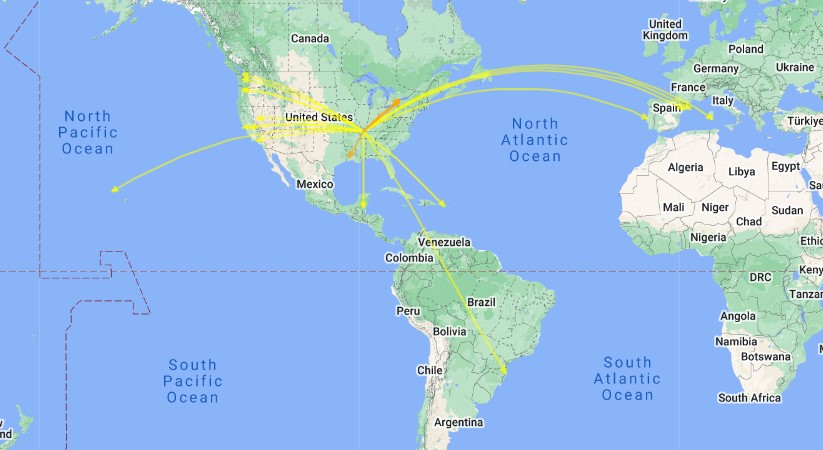
For radios, John was runnning his Xeigu G90 at 15 watts into a EFHW antenna. I was running my IC-705 at 5 watts into my 28.5′ Random Wire antenna. Towards the end my radio developed a glitch and refused to transmit. I was using my iPad via WiFi to make the FT8 contacts and I think that connection caused a setting to change. When I got home and warm, it took me about 3 minutes to figure it out. I still had a pretty good day. Here is a QSO map from my station.

The goal of these event for our club is not how many contacts we make, but how much fun we have and a large part of that is enjoying each others company. Field Day is only a couple of months away — can’t wait.

Below is a short video. It is a little jittery as I had navigate around people and chairs etc. If you’re prone to vertigo, you may wish to skip this one.

Shack Shake up and a New Cootie Box

I’m still a little land-locked but as my wife continues to improve after her surgery, I will be able to get a away. That hasn’t stopped me from tinkering in the shack and playing radio. Today I graduated from CWI and I am now an Alumni. For those wishing to improve their CW Skills, I recommend attending CW Innvations https://cwinnovations.net

One of the things I did today was shake up the shack a little. I had the Elecraft K3 installed at the home QTH. As I looked at the radio, I realized that it looked and felt out of place. In reality it is the best field radio I have and with that in mind I pulled it off of the desk and put it in a travel box. I like to take this radio out for my local club events like Field Day, Winter Field Day and the Support Your Parks on the Air Weekends. In its place I moved one of my IC-7300’s to the desk. The 7300 is a very versatile radio capable at home or abroad. The 7300 compliments the IC-7610 as they operate in a similar fashion.

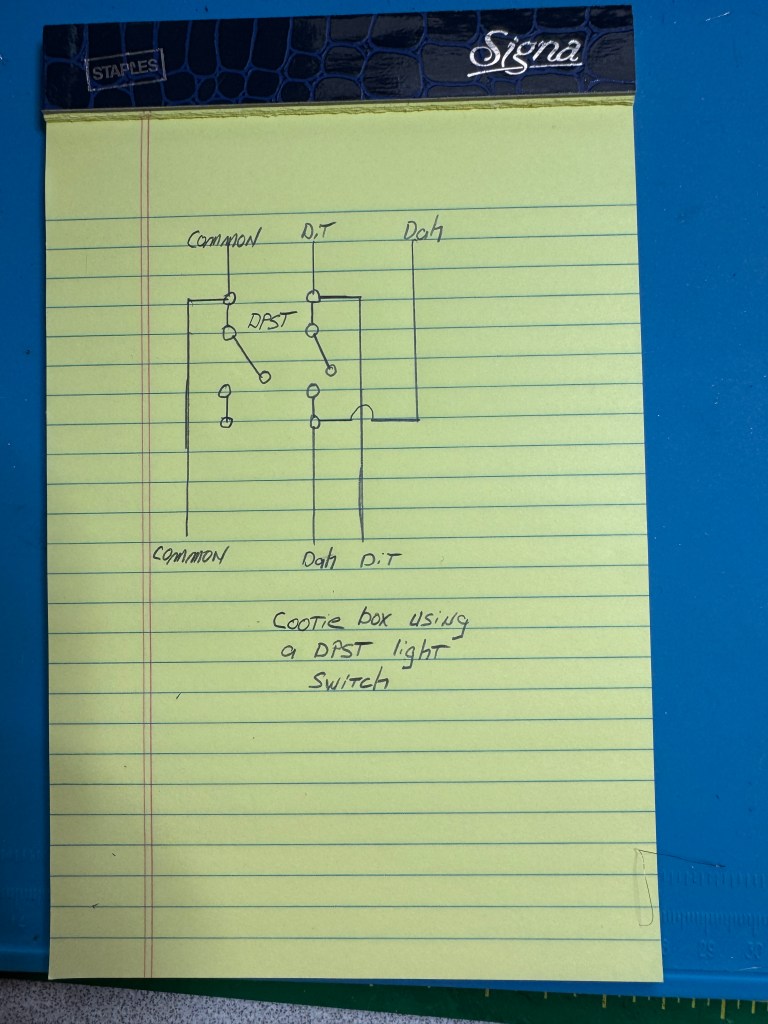
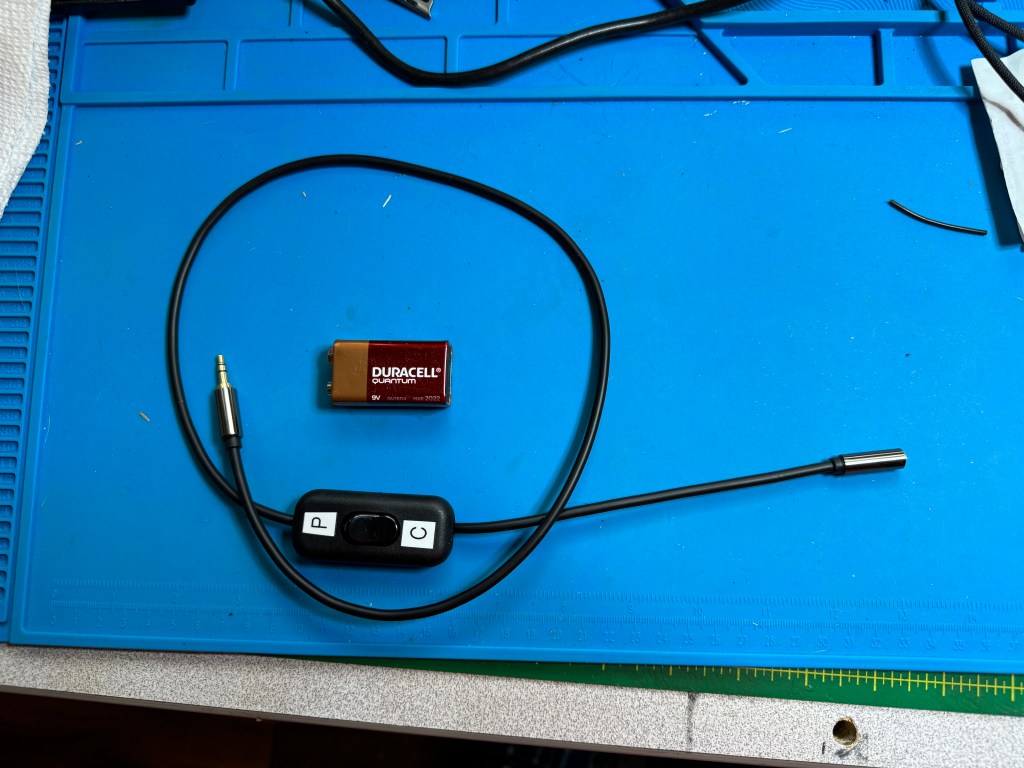
I also made another version of my Cootie Box using a DPST light switch and a 1/8″ TRS plug cable. It cost about $15 and 30 minutes of time. Parts are from amazon:
Stereo Cable
DPST Light Switch
No soldering required as the switch has screw down terminals. Here is a shematic:

I have a male end on one side and a female end on the other. I have some paddles with the cable attached so having the female end is for convenience. The cootie box is not much bigger than the cables I normally use.

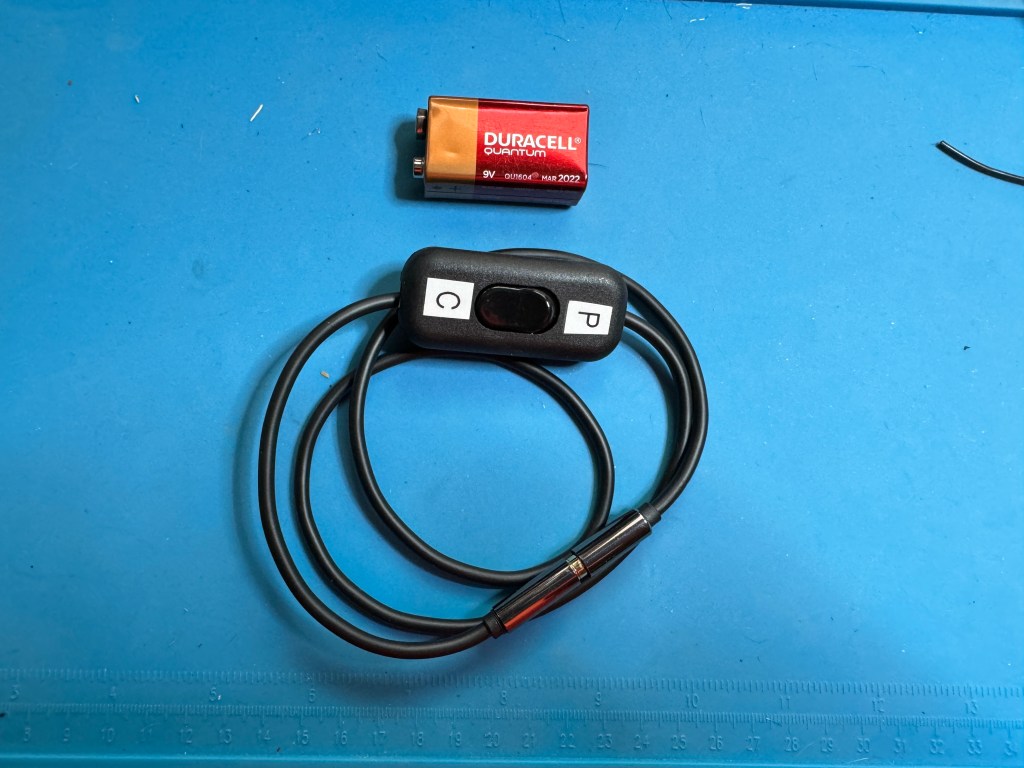
Having a male/female end allows me to coil it up.

This Cootie Box is small enough to take anywhere and allows me to work straight key events without having to bring an extra key with me. The switches I bought come in two’s so I may make another one. 73 — Scott

Another case of the doldurms

I’m in the doldurms again – radio doldurms. This time it is due to my wife having a hip replaced. It happened quickly. She saw the doctor one day and a week later she had a new hip. Over the years, recovery times have decreased but there still is a recovery time. Each day she gets a little more steady on her feet. The caveat is, I still have to do a lot of things around the house. Yes, she is worth it.

I haven’t been on the radio much. I mostly turn it on to do some head sending for my CWI class and sometimes I listen to a QSO. I try to make my codebuddy skeds as long as everything else in the house is copasetic. I try to do some of the CWI exercises at night when things quiet down. I am still doing the things, at a slower pace.

I have goals I want to attain. While in the doldrums, I have switched from my bug to a singlepaddle/sideswiper. I also use paddles and I found it difficult switching from the bug to the paddles. The bug requires a heavier hand, especially on the dit side. You have to hit it a little harder to get the pendulum vibrating. A sideswiper has a similar feel to a paddle. One thing to note, is I cannot set the contacts on a sideswiper as close as I can on paddles. It tends to mush the dits and dahs together. I am currently using a KN4YB SL-85 sideswiper. It has a shorting bar so you can use it as a single lever paddle or a sideswiper.

One negative about using a single lever as a sideswiper is it bothers my arthritis. I have it in my fingertips and it can get painful after a while. I may switch to a cootie key that bends and softens the contact. I have spent most of my CW time with paddles using a keyer. I thought in retirement I would give a straight key a go. I have been practicing and I am using my code buddies as crash dummies. They report that I am doing a pretty good job. One of the reasons I am trying a straight key, is I have 4 nice county parks in my county that are not POTA regulation. My nearest POTA parks are about 45 minutes away. So I joined SKCC and when life gets a little more normal around here, I want to start working on SKCC from home and portable.

Another goal I have is to become more conversational in CW. I have close to 2,000 CW contacts in POTA but they are just exchanges. It’s the reason I am taking a CWI Class. I want to have pass-the-time-of-day QSOs on CW. Right now my code buddies and I are around the 20-25 minute mark for a QSO. We are operating around 17 wpm. POTA exchanges I can do at 22+ wpm.

The good thing about CWI is the end of the class is not the endgame. What CWI does is give you the tools to practice and teaches you how to use them. They teach you how to diagnose any problems you have and what tools to use to fix them. Even though I am a little behind right now, when my life returns to more normal, I will be able to continue my studies.

Finally, I wish to get my code speed up to 25-30 wpm. I am one of two CW ops in my club and usually do CW during the Field Days. I am okay at around 25 wpm or so when searching and pouncing however, I would like to be able to run and hold a frequency. Once life returns… I have plans to participate in some of the CW activities such as CWTest, and I may try for a CWOps number. That may be a ways a way.

That’s the long and the short of it. I hope to see y’all out there once QRV becomes more of a reality. 73 – Scott

Cootie Box

Sometimes you got to go both ways. I recently decided I wanted to do more straight key stuff and I setteled on a sideswiper as my weapon of choice. However, I am still much more proficient with a set of paddles. Often when I go to the field for activities such as Field Day (both) or POTA/SOTA I use paddles. Now that I’m gearing up for the Straight Key Century Club (SKCC), I want to have the opprtunity to make SKCC contacts also. I do own one sideswiper key from KN5YB, Tom makes nice keys and I like the one I got from him very much. I did realize that the feel between a sideswiper and paddles is very close and since I have some nice paddles, why not make them work like straight keys.

To make a paddle into a sideswiper all that is needed is to short the Dit and Dah contacts together. This can be done with a jumper or my cootie cable https://kk4z.com/2024/01/26/cootie-cable/. While these work, I wanted something a little easier to switch back and forth so I came up with the Cootie Box. Inside is the cootie that makes the magic.

The circuit is very simple.

It only takes a few parts.

These can be found on Amazon:
Project Box
3.5mm Stereo Jacks
20 ga Wire
Note: 20 ga was far too big. 24 or 26 ga. would be better
SPST Switch
I also used solder and some heat shrink I had on hand.

I connect 5 wires on one of the jacks 2 for the Dit and 2 for the Dah contacts. One of each goes to the other jack and one of each goes to the switch. The fifth wire is the common. Since I had wire that was too big, after I cut away the insulation on the Dit and Dah contact wire, I separated the strands into two groups. I then cut the insulation off of the wires that goes to the switch and attached them to the contact wires.

I soldered the two wires together and then trimmed them before I attached the other tail to the jack. I used heat shrink to insulate the connections

Before you go any further, feed the one jack you finished soldering through the project box and thread one nut with all five wires and fasten the jack to the project box. Then thread the nut to the other jack with the three wire that go to the opposite jack. Do not thread the switch wires through the second nut. Pass the wires through the hole in the project box and solder them to the opposite jack making sure you have the Dit and Dah contacts wired correctly or they will be reversed (trust me on this one).

With the switch wired and soldered it should look like this.

Wire and solder the oppsite jack, put together, label the switch and Viola! Cootie Box.

It does not matter which end of the Cootie box is plugged into what – completely reversable. One thing I like about the box over the cable is I feel the box is more durable.

Here is a short video of the Cootie Box in action: