FTX-1 vs IC-705 Physicality

I decided to take a look at the FTX-1 and see how it compares to the IC-705. I now have both (I own both) so I can take a good look at each in comparison. My intention is to treat this in a similar fashion as I did for the FT-710/IC-7300. My take is not an in depth technical review but how the radios are perceived through the eyes of a user/operator. First up is the physicality of the radios.

The screens are the same size on both radios. The FTX-1 is a little wider and the IC-705 is a little thicker.

Adding the batteries seems to equalize this as the Icom’s battery is set into the radio and the Yaesu’s sticks out.

One is wider, one is thicker, handling the two radios, I would say it’s a wash.

Weight
Here there is a difference. The Yaesu weighs more. Handling the radios, the Yaesu feels heavier than it actually is. It feels like a brick.
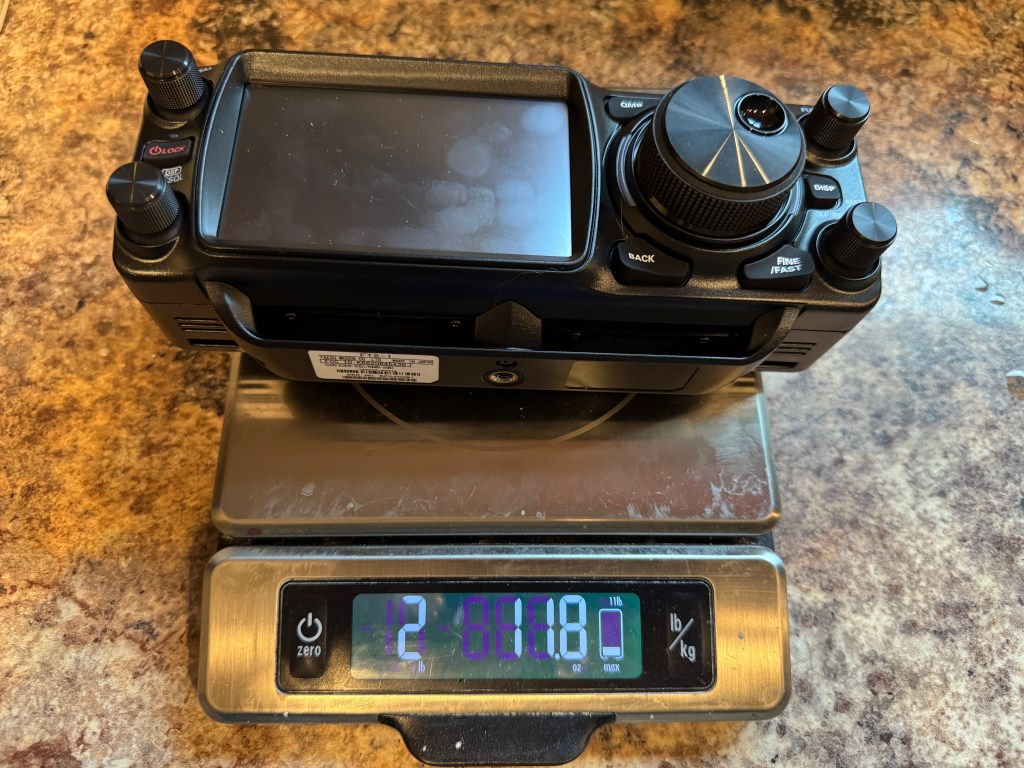
The FTX-1 is 6.3 ounces or 17% heavier than the IC-705. with out the batteries. Adding in the batteries.
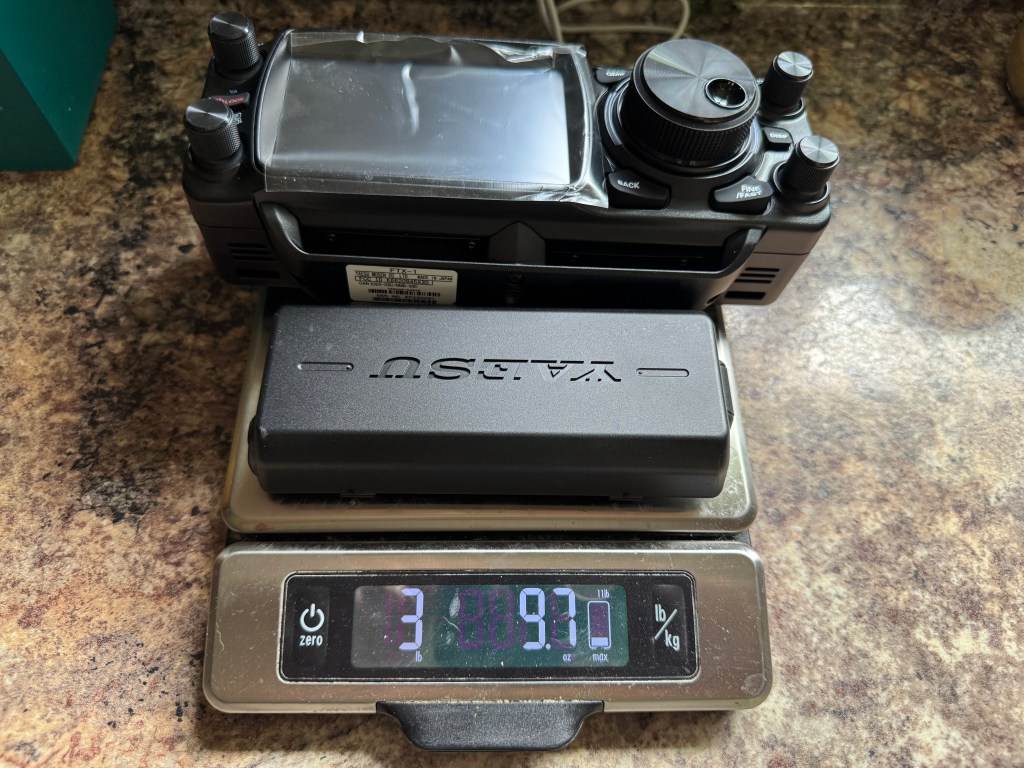
For the Icom, I added to additional batteries to bring the total storage up to 6.3 Ah similar to the Yaesu’s 6.1 Ah battery. Even so, the IC-705 weighs less than the FTX-1 by 9.4 ounces or 16.34%. Note: The Icom with a 3.3 Ah battery weighs about 1 pound less than the FTX-1 with a 6.1 Ah battery (see the next post about power).

Size wise, I feel the radios are comparable, they would both fit in a pack or box interchangeably. Weight could be an issue for some. For those doing a POTA activation carrying their radio from the car to a park bench 50 yds away, weigh will probably not be an issue. For those who like to pack it in or do SOTA, weight would be a more critical concern. For me, my days of over hill and dale are pretty much done. If I had to travel light I would turn to my Elecraft KX2.

Next up power with some more surprises de Scott

Hamrs Pro

This past trip I was able to check out the new Hamrs Pro app. I must say I am impressed. I spent some time prior to my trip setting it up for a POTA activation. Here is my current setup:

Hamrs uses FLrig to interface the radio with the app. When the radio is connected, frequency, band, mode, and power is updated in the app. In addition, Hamrs Pro will set the RST to either 59 or 599 depending on the mode. Another nicety is when you add the POTA park number in “My Park” it will automatically add the Maidenhead Gridsquare to “My Grid”.

Tabbing is straight forward. It goes from left to right and top to bottom. In my set up I have received RST first since that is the first one I get and then a quick tab and I add mine. Time on is automatic. I always believed that computers should work for us and not the other way around. With Hamrs Pro, it does most of the heavy lifting for you.

Another place where Hamrs Pro shines is the POTA spots.

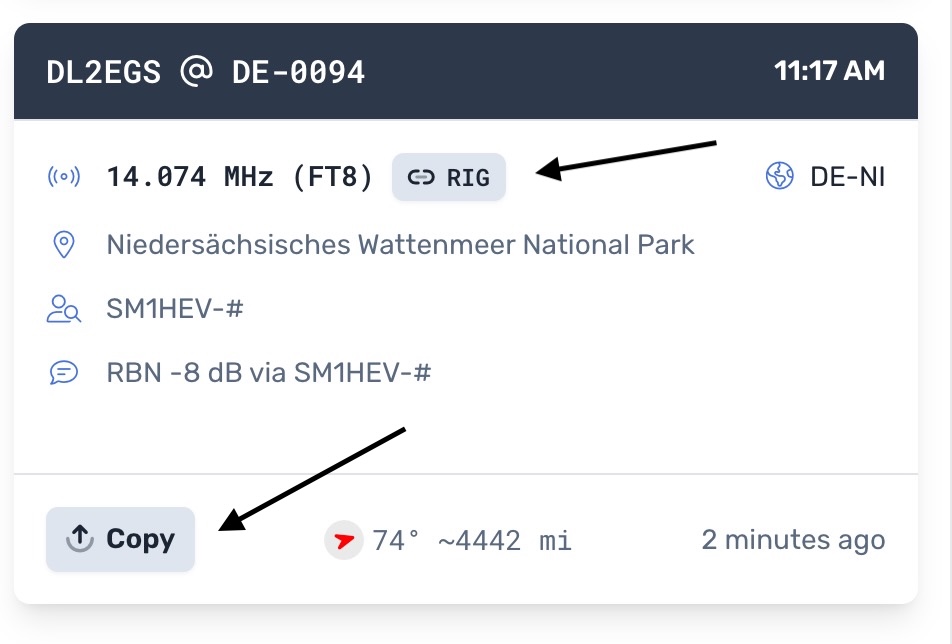
There is a lot of info on the page to include compass heading and distance. If you click on the RIG button, Hamrs Pro transfers the frequency and mode to your radio. If you click the Copy button, the information is copied into the log. Add RST, hit save and you’re done. Pretty slick.

So far the only improvement I can think of is using Hamrs Pro with FT8. I don’t see an easy way to interface Hamrs with WSJT. This is not a big deal. All I do is log FT8 contacts in ACLog export the log as an ADIF, and then import the ADIF into Hamrs. It is easier than it sounds. Another way might be to use the WSJT log function and import that into Hamrs Pro.

Hamrs Pro with a $2 a month subscription allows you to sync your logs across platforms. I have Hamrs Pro on my Mac, IOS, IPadOS, and Windows. As along as I have internet or WiFi, they sync. This is great because I mainly use Windows for radio stuff and Apple for everything else. I can create a log on my Evolve III or my iPhone, and when I get home I can upload the log to POTA on my Mac — easy peazy.

I have been using Hamrs on and off since the beginning. This is a hugh step –in the right direction. I can see this as becoming my go to logging app. A lot of thinking and work has gone into Hamrs Pro. I can only see it getting better. Good job Hamrs folks. de – Scott

Yaesu FT710 – Second Impression

Here is my first look at my second FT710. I will start with the settings I changed and then go over the list of issues I had with the first one. The first FT710 had the original firmware as it was new at the time. This one has several updates under its belt.

Settings/Changes

  1. T710,Taped Power Cables every couple of inches to reduce tangles.
  2. Added Anderson Power Poles to the power cable
  3. Turned off 3DSS
  4. Set waterfall span to 5K
  5. Set waterfall speed to slow2
  6. Set color to 6
  7. Set level to +3.5 dB, peak to level 2 and contrast to level 14
  8. Set tuner type to EXT
  9. Set Tuner/Lin Port to Linear
  10. Set keyer to Elekey B, repeat interval to 3 seconds, Weight to 2.7 and Pitch to 700Hz
  11. QSK – on
  12. Set MyCall to KK4Z and call time to 3 seconds
  13. Set Mic gain to 60 and Processor level to 65
  14. CW mode on
  15. Meter Detector to Peak
  16. Receive Audio SSB – Treble +3 Middle +5 Bass -2
  17. Receive Audio CW Treble +3 Middle +1 Bass -3
  18. Parametric Equalizer (processor on/off the same)
    1. E1 – Freq 300 Bandwidth 10 level -3
    2. E2 – Freq 1300 Bandwidth 2 level 10
    3. E3 – Freq 2400 Bandwidth 1 level 10
  19. Needs a 32gb (no larger) SD card. Scandisk Ultra SDHC UHS-I 32 GB works
  20. Mouse. Seems the only wireless mouse you can use with the radio is a Logitech M310. It does not appear to be in production anymore. I had to buy a renewed one. I got the mouse working and I think it is a good addition to the radio. It does make changing parameters easier and if you click on a signal in the waterfall, the radio will QSY to that frequency. I wasn’t sure how I was going to like using a mouse, but I think I like it.

Here are the issues from the first radio:

  1. Could not use LDG tuner with the radio — it was a surreptitious route to get a tuner to work. I started out with a different tuner, an LDG IT-100 which uses a different cable. I coupled the tuner with an LDG IC-108 cable. The cable is not listed as usable on the FT710. The other twist was setting the Tuner/Lin Port “Linear” instead of Ext Tuner. This little tidbit is not shared by Yaesu, I had to find it on an internet forum. To tune the antenna you push the tune button on the tuner (not on the radio) to get things going. This is where Icom shines. They have been using the same interface at least as far back as the IC-718 and the IC-706. A tuner I bought for my IC-706 MKIIG still works on my IC-7300 with the same cable and I can use the tune button on the radio. The other downside is you cannot use the FH-2 Remote pad when using the auto tuner as it uses the same port at the back of the radio. In addition, you cannot run an amplifier and an auto tuner at the same time. Icom has separate ports for the tuner and amplifier.
  2. No Portable Zero Rails – I use rails on all of my portable radios. Portable Zero now makes rails for the FT710.
  3. Could not use RT systems software – it took Yaesu until July 2023 to get the info to RT Systems. I have RT Systems software for almost all of my radios. RT systems software works fine now.
  4. Auto Notch — I don’t remember auto notch working on the first radio I had. It works now.
  5. Cannot edit/see QMB – another place where Icom shines. I can go into the memo pad (Icom’s QMB) and edit the entries.
  6. RJ45 mic connecter instead of Foster (Icom)- Foster connectors are more durable than the RJ45.
  7. Key clicks in the headphones using CW – They are still there but less pronounced. The CW is harsh sounding and can be fatiguing to listen to over long periods.
  8. WSJT software would change modes when switching bands
  9. Waterfall is not averaging like Kenwood’s or Icom’s. It has to be adjusted manually (and sometimes frequently)
  10. Filter only has 2 selections vs 3 for the Icom. Narrow which only has predefined values and wide which is adjustable. The Icoms have 3 selections each fully adjustable. Icoms can also adjust the filter shape (soft or sharp. The FT710 has contour and APF. Contour is like a soft notch filter and APF boosts the center frequency like a CW signal. Icoms have dedicated controls on the front panel while the Yaesu has a mix of front panel controls and menu items.

Even with all of its quirks, I like the little radio. Yaesu appears to have fixed most of its problems, at least enough to make the radio fun. I still believe this radio compares well with the IC-7300 and either will serve you well. If I could only have one, I would still go with the Icom. The Icom has a lower noise floor, the settings (ergonomics) are better, and it hears as well as the Yaesu (at least in my side by side test). For CW again, the edge goes to Icom. However, the Yaesu has its pluses. The FT710 has a slightly better audio quality let’s say more fidelity but in CW the tone is more harsh than the Icom. The Yaesu has a better attenuator with 3-steps instead of one. With the Yaesu, you can transmit CW while in SSB mode. I like the filter window on the FT710. I can see how changing the filter affects the signal.

Later this week I have Portable Zero rails coming. They are pricy, but I find them very useful on my field radios. I also have a Maestro Evolve III coming which I will setup software for the FT710 on it. I hope to have everything ready for Winter Field Day.

I think a major difference between the IC-7300 and the FT710 is settings. Yaesu gives you settings on top of settings, while the Icom gives you what you need. If you like to tinker and tweak, the FT710 is your radio. If you want to get down and operate, then Icom is the way to go. Out of the box, I had to do far less setting up with the Icoms.

Compared to the FTDX10. I owned an FTDX10 for about 18 months. If I bought one today, the cost would be about $600 more than the FT710. I’m not sure the FTDX10 is that much better than the 710. My primary use for this radio is for the field. More to follow es 73 de Scott