
This past trip I was able to check out the new Hamrs Pro app. I must say I am impressed. I spent some time prior to my trip setting it up for a POTA activation. Here is my current setup:

Hamrs uses FLrig to interface the radio with the app. When the radio is connected, frequency, band, mode, and power is updated in the app. In addition, Hamrs Pro will set the RST to either 59 or 599 depending on the mode. Another nicety is when you add the POTA park number in “My Park” it will automatically add the Maidenhead Gridsquare to “My Grid”.
Tabbing is straight forward. It goes from left to right and top to bottom. In my set up I have received RST first since that is the first one I get and then a quick tab and I add mine. Time on is automatic. I always believed that computers should work for us and not the other way around. With Hamrs Pro, it does most of the heavy lifting for you.
Another place where Hamrs Pro shines is the POTA spots.
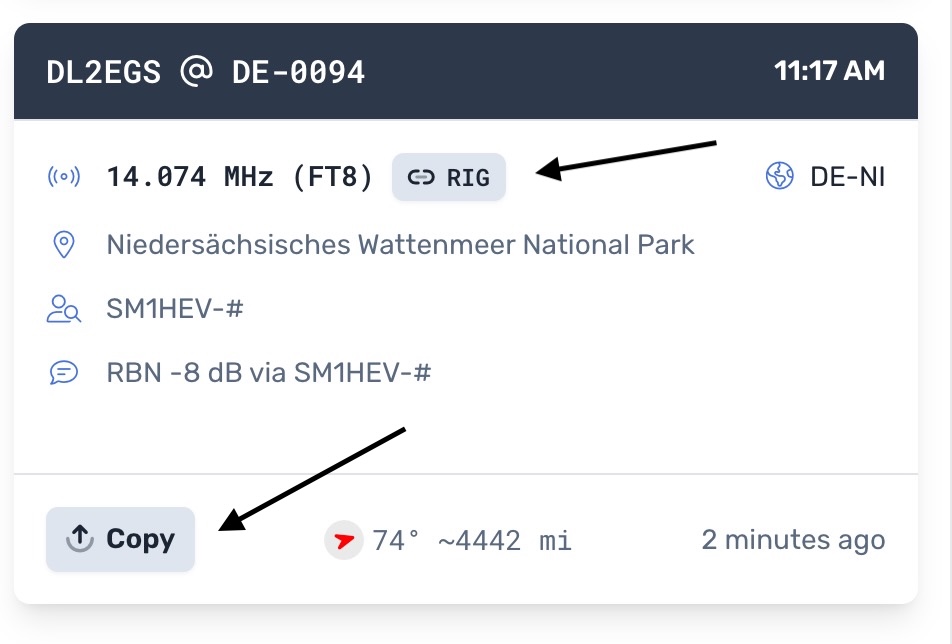
There is a lot of info on the page to include compass heading and distance. If you click on the RIG button, Hamrs Pro transfers the frequency and mode to your radio. If you click the Copy button, the information is copied into the log. Add RST, hit save and you’re done. Pretty slick.
So far the only improvement I can think of is using Hamrs Pro with FT8. I don’t see an easy way to interface Hamrs with WSJT. This is not a big deal. All I do is log FT8 contacts in ACLog export the log as an ADIF, and then import the ADIF into Hamrs. It is easier than it sounds. Another way might be to use the WSJT log function and import that into Hamrs Pro.
Hamrs Pro with a $2 a month subscription allows you to sync your logs across platforms. I have Hamrs Pro on my Mac, IOS, IPadOS, and Windows. As along as I have internet or WiFi, they sync. This is great because I mainly use Windows for radio stuff and Apple for everything else. I can create a log on my Evolve III or my iPhone, and when I get home I can upload the log to POTA on my Mac — easy peazy.
I have been using Hamrs on and off since the beginning. This is a hugh step –in the right direction. I can see this as becoming my go to logging app. A lot of thinking and work has gone into Hamrs Pro. I can only see it getting better. Good job Hamrs folks. de – Scott
 KK4Z
KK4Z 